
Run a hybrid cycle counting program that blends ABC prioritization, location-based sweeps, and opportunity counts, driven entirely by daily WMS-generated lists with fixed variance thresholds and clear SLA targets. That combination is what separates 3PLs with clean inventory records from ones drowning in recount loops. Everything below breaks down how to build it, staff it, and scale it across clients.
TL;DR:
- Counting high-value SKUs weekly and slower-moving ones quarterly aligns with their respective impact on inventory accuracy and operational costs.
- Automating count list generation, incorporating event triggers, and locking schedules into the WMS reduce errors and eliminate manual decision-making.
- Maintaining a baseline inventory record accuracy above 98% relies on proper personnel roles, photo evidence, fixed variance thresholds, and strict recount caps.
- Handling co-mingled inventory requires lot or batch tracking, and routine SKU reconciliation minimizes discrepancies caused by stale or renamed SKUs.
- Regular reporting with clear SLA-based accuracy targets, defined escalation protocols, and well-trained staff—including temporary workers—supports scalable cycle counting success.
Table of Contents
- Cycle Counting Methods for 3PLs: ABC, Random, Control Group, Location, and Opportunity
- How Do You Set Cycle Count Frequency in a 3PL?
- What WMS and Device Features Actually Reduce Count Errors?
- What Is the Right SOP for a Warehouse Cycle Count?
- Which KPIs Actually Tell You the Program Is Working?
- How Do You Pilot a Cycle Counting Program Before Scaling It?
- Managing Multi-Client Ownership and Different Accuracy Requirements
- How Should a 3PL Report Cycle Count Results to Clients?
- Training and Staffing for 3PL Cycle Counts, Including Temp Workers
- Handling Co-Mingled Inventory and SKU Rationalization in a 3PL
- Publisher Perspective: Applying These Practices in Real 3PL Operations
- Get Your Cycle Counting Program Built Right the First Time
- Sources
Cycle Counting Methods for 3PLs: ABC, Random, Control Group, Location, and Opportunity
Each method solves a different problem, and most 3PLs need at least three of them running at once.
ABC counting ranks SKUs by value or movement and counts the top tier most often. The Pareto principle holds up well here: roughly 80% of inventory value or movement typically comes from about 20% of SKUs. In a multi-client warehouse, that means running ABC classifications per client, not just site-wide, since Client A’s top mover might be Client B’s dead stock sitting two racks over.
Random sampling picks locations without pattern, which catches errors that a predictable count schedule would miss. Associates who know exactly which bin gets checked every Tuesday tend to be more careful there and sloppier everywhere else.
Control group counts track a fixed set of locations repeatedly to validate that a counting procedure or a new hire is producing reliable numbers before trusting them on the full floor.
Location-based counts sweep a physical zone regardless of SKU value, which is how you catch slotting drift, mis-shelved product, and phantom inventory that ABC counts alone would never touch.
Opportunity counts happen when a location is already open, during replenishment, a pick discrepancy, or a return, so you get a free accuracy check with zero extra travel time.
A workable hybrid mix for most 3PL floors:
- ABC counts drive the daily volume (highest frequency, highest labor cost).
- Location sweeps run weekly to cover blind spots ABC misses.
- Opportunity counts fire automatically off transactional triggers.
- Control groups run quarterly to audit the counting process itself.
How Do You Set Cycle Count Frequency in a 3PL?
Frequency should follow value, not habit. A items, the top tier by movement or value, are counted weekly or multiple times a month. B items are counted monthly. C items, the slower-moving stock, are counted quarterly. That’s the baseline most cycle counting programs run on, and it scales cleanly once you build client overlays on top of it.
- Classify by client, then merge for the floor schedule. Each client’s SKUs get their own A/B/C tier, but the daily count list combines everyone’s A items into one physical route so associates aren’t crisscrossing the warehouse for one client at a time.
- Target 8 to 15% of pick locations daily. Hybrid programs generally aim for daily counts covering 8 to 15% of total pick locations, adjusted up during peak receiving and down during slow stretches.
- Build in event triggers. A large receipt, a return spike, or a variance flag on a location should automatically add that location to tomorrow’s list, no manager intervention required.
- Shift labor seasonally. Increase A-item frequency ahead of high-volume periods like Q4, and reallocate that labor toward location sweeps during the slow months.
- Lock the schedule into the WMS, not a spreadsheet, so nobody is manually deciding what gets counted each morning.
What WMS and Device Features Actually Reduce Count Errors?
Cycle counting programs succeed or fail based on the technology behind them, not the counters. A WMS with weak count-list logic will bury your team in recounts no matter how well trained they are.
Essential WMS capabilities:
- Automated count list generation based on ABC tier, last-count date, and event triggers.
- Client tagging so inventory ownership stays visible on every count screen.
- Built-in recount workflows that route variances back to a second counter automatically.
- Audit logs that timestamp every count, adjustment, and approval.
On the device side, handhelds need reliable offline mode for dead zones, location verification before quantity entry, and weight-based counting for bulk bins where scanning every unit isn’t realistic. Integration matters just as much as the count itself: near-real-time syncing with merchant platforms like Shopify prevents oversells the moment a count adjustment posts, and a clean Shopify-to-3PL SKU mapping keeps that sync from breaking on channel-specific SKU naming.
Pro Tip: Before piloting new hardware, test it in your worst Wi-Fi dead zone first, not your best aisle. That’s where offline sync actually gets proven.
What Is the Right SOP for a Warehouse Cycle Count?
A clean SOP keeps counts fast and defensible when a client asks “why did my number change.”
- Close transactions and pull the list. No open picks or receipts against a location before it’s counted, and the day’s list should generate automatically from the WMS.
- Scan in sequence, location first, then SKU, then quantity, in that order every time. Skipping the location scan is the single most common source of mis-posted adjustments.
- Apply a fixed variance threshold, commonly ±2 units or ±5%, whichever is tighter for that client’s SLA.
- Cap recounts at two. If a second recount still doesn’t match, escalate to a supervisor rather than running a third pass. Capping recount loops keeps labor from bleeding into a single stubborn variance.
- Use blind counts for A-items and anything with a history of drift; sighted counts are fine for low-risk C-items where speed matters more.
- Require photo evidence for any adjustment above the variance threshold before it posts.
- Split roles: counter, verifier, sweeper for recounts, and a back-office poster who owns the adjustment log. No single person should count and approve their own variance.
Which KPIs Actually Tell You the Program Is Working?
Three numbers matter more than the rest.
- Inventory Record Accuracy (IRA): the percent of locations matching system quantity. Target above 98% for A-items, and watch the trend line over point-in-time snapshots.
- Count productivity: items or locations counted per hour, tracked separately from recount overhead so a bad SKU doesn’t tank your whole team’s numbers on paper.
- Exception resolution time: how long a flagged variance sits before it’s reconciled and posted.
If shortages are climbing, that usually points to a picking or receiving process failure. Rising overages more often mean receiving is putting stock into the wrong location. A pilot benchmark worth tracking: recount loops per 100 counts, which isolates the hidden labor tax that recounts quietly add to your productivity metric.
How Do You Pilot a Cycle Counting Program Before Scaling It?
Run the pilot for 2 to 4 weeks on one representative client and a mixed SKU set, not your easiest account.
- Capture baseline IRA, counts per hour, recount loops, and exception resolution time before day one.
- Define success up front: an IRA improvement that holds, stable or improved counts/hour, and fewer recount loops.
- Expect early friction from device reliability, faded barcode labels, and client data that doesn’t match your SKU master. Fix labeling issues before blaming the process.
- Once the pilot clears its thresholds, roll out site by site, prioritizing your highest-volume client tier first so the biggest accuracy win lands where it matters most.
Managing Multi-Client Ownership and Different Accuracy Requirements
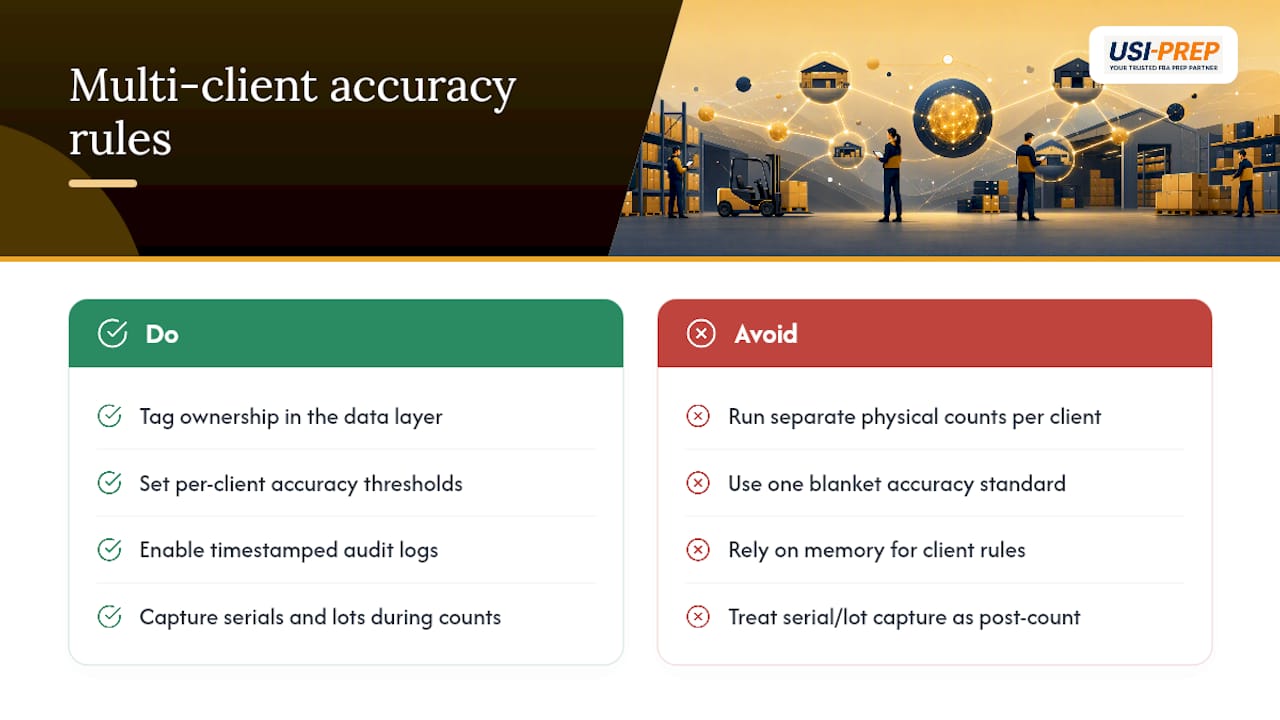
Every client thinks their inventory is the priority, and technically, they’re all right. The fix isn’t running separate physical counts per client. It’s tagging ownership at the data layer while keeping one unified floor schedule.
Set the accuracy bar at the client’s tier, not a blanket house standard. A client shipping high-value electronics on tight FBA lot tracking requirements needs a tighter variance threshold than a client moving low-cost apparel. Build that into the WMS as a per-client field, so the same warehouse can run ±1% for one account and ±5% for another without anyone manually remembering which rule applies where.
Ownership disputes usually surface around damaged or missing inventory, and that’s where audit logs earn their cost. If a client challenges a shortage, you need a timestamped trail showing who counted it, who verified it, and what photo evidence backed the adjustment. Without that, every variance conversation turns into a “he said, she said.”
Serial number tracking and lot tracking add another layer for clients selling regulated, high-value, or recall-sensitive products. A generic count that confirms “12 units on the shelf” doesn’t satisfy a client who needs to know which 12 units, tied to which lot, in case of a recall. Build serial and lot capture into the count workflow itself rather than treating it as a separate reconciliation step after the fact, especially for inventory tracked across multiple fulfillment centers where lot data has to stay consistent site to site.
How Should a 3PL Report Cycle Count Results to Clients?
Clients don’t want raw count data. They want to know three things: is their inventory accurate, what changed, and what you’re doing about it.
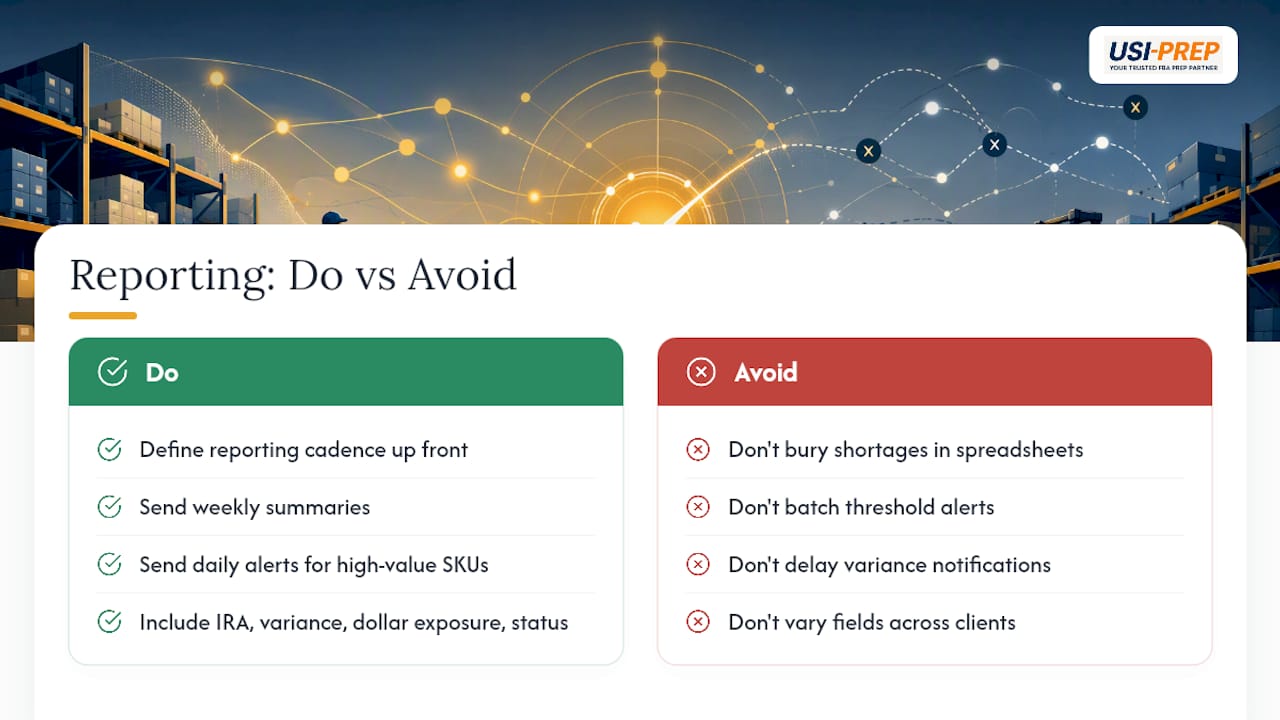
Set a reporting cadence up front, weekly summaries for most accounts, daily alerts for high-value or high-velocity SKUs. A weekly report should show current IRA, variance count, dollar exposure of open discrepancies, and resolution status on anything still open from the prior cycle. Don’t bury a shortage in a spreadsheet tab and call that transparency.
Adjustments above the variance threshold deserve their own notification, sent as they happen, not batched into the weekly rollup. If a client’s SLA promises 98% accuracy and a location just posted a variance that threatens that number, they should hear about it before they notice it themselves in their own dashboard.
Standardize the format across clients even when the underlying data differs. A consistent report template, same fields, same layout, just filtered to that client’s SKUs, builds trust faster than a custom report built from scratch for every account. It also makes your own internal review faster, since your ops team isn’t relearning a new format every time they check on a different client.
Escalation protocol matters as much as the report itself. Define in the SLA exactly what variance size or dollar value triggers a phone call versus an email, and stick to it. Clients forgive an honest miss. They don’t forgive finding out about it a week late in a routine summary.
Training and Staffing for 3PL Cycle Counts, Including Temp Workers
Cycle counting quality tracks almost directly with how well the counter understands why the count matters, not just how to scan a barcode. Full-time warehouse staff can absorb that context over time. Temp workers, who often make up a large share of a 3PL’s floor during peak season, don’t have that luxury.
Build a short, scenario-based training module specifically for cycle counts, separate from general warehouse onboarding. Cover the scan sequence, what a variance threshold means, and what to do when a count doesn’t match, which is almost always “flag it, don’t fix it yourself.” Giving a first-week temp worker authority to override a system count is how small errors turn into client escalations.
Assign roles based on tenure and reliability, not availability. New or temporary staff work well as counters on low-risk C-item sweeps. Verifiers and recount handlers should be experienced associates who understand the client’s specific SLA sensitivities. Keep the back-office poster role, the person who actually approves and submits adjustments, restricted to permanent staff with WMS access and accountability tied to their login.
Cross-train at least two people per shift on every role so a single absence doesn’t stall the day’s count list. And revisit training content every time you onboard a new client with unusual requirements, like serialized inventory or lot-tracked pharmaceuticals, since generic training won’t cover those edge cases.
Handling Co-Mingled Inventory and SKU Rationalization in a 3PL
Co-mingled inventory, where physically identical stock from different clients or channels sits in the same bin, creates a counting problem that pure-play warehouses never deal with. A count that’s numerically accurate can still be wrong at the ownership level if units get attributed to the wrong client.
The safest approach is to avoid co-mingling wherever contract terms allow it, but that’s not always realistic for high-volume, low-margin SKUs where dedicating separate bins per client wastes space. Where co-mingling is unavoidable, lot or batch tracking becomes the only reliable way to reconstruct ownership after the fact, especially for clients selling on Amazon where FBA lot tracking requirements can require proof of which unit came from which inbound shipment.
SKU rationalization adds a second layer of complexity. Clients rename SKUs, merge variants, or discontinue products without always telling the warehouse in time. A count list built off a stale SKU master will flag false variances that have nothing to do with actual inventory accuracy, they’re data mismatches dressed up as counting errors. Build a routine SKU reconciliation step ahead of each cycle count run, comparing the client’s active catalog against what’s live in the WMS, so the count team isn’t chasing phantom discrepancies caused by a SKU that was renamed three weeks ago and never updated on your end.
Publisher Perspective: Applying These Practices in Real 3PL Operations
Most accuracy problems trace back to slotting drift and stale SKU data, not lazy counters. Usiprep was built by former Amazon sellers who watched this play out from the client side of the relationship, waiting on inventory numbers that never quite matched reality. That’s shaped how we think about count discipline: fast check-ins, tight variance rules, and a 98.9% on-time delivery rate that only holds up when the inventory record underneath it is actually correct.
— Akbar
Get Your Cycle Counting Program Built Right the First Time
The company aims to provide fast inventory check-ins paired with full visibility into what’s actually on the shelf, backed by SLA-driven accuracy targets rather than vague follow-ups on discrepancies.

Building the hybrid ABC and location-count program described above takes the right WMS setup on day one, not a retrofit six months in. The team works directly with sellers to structure inventory workflow from the first inbound shipment, aligning count lists, variance thresholds, and client reporting before volume ramps up. If you’re prepping inventory for Amazon FBA and want a faster, more transparent check-in process behind your counts, look at how Usiprep speeds up FBA prep and get a quote for your next shipment.
Sources
- Inventory cycle counting: Using inventory control software for cycle counting | NetSuite
- A simple guide to cycle counts (+ best practices & benefits) – Shopify
- Cycle counting inventory | TouchPath
- 3PL cycle counting best practices for ecommerce brands | Forthmatch