
The fastest path to automating your ecommerce fulfillment is connecting your storefront to a fulfillment system that handles real-time order sync, inventory updates, shipping and tracking, and return merchandise authorization (RMA) processing. For most U.S. brands, that means a prebuilt connector or API/webhook integration between your store (Shopify is the most common starting point), your fulfillment partner or warehouse management system, and Amazon FBA if you sell on Amazon. Usiprep, founded by former Amazon sellers, handles this end-to-end for U.S. brands including FBA prep.
Minimum technical must-haves before you start:
- A prebuilt connector or API/webhook access between your storefront and fulfillment system
- A complete, normalized SKU map covering all variants, bundles, and kits
- Carrier account credentials and shipping rate access for automated rate-shopping
- An RMA workflow that triggers automatically when a return is initiated at the storefront
Immediate next steps (TL;DR):
- Pick your integration method (connector, API, or middleware)
- Prepare 5–10 test SKUs including a bundle and a return scenario
- Schedule a 2-week pilot on a low-volume SKU or region before full rollout
Table of Contents
- Why should you integrate fulfillment software with your ecommerce store?
- Which integration approach fits your business?
- What data flows do you need to map between your store and fulfillment system?
- How do you connect your store to a fulfillment system technically?
- Step-by-step implementation checklist and realistic timeline
- What does integration cost, and what ROI should you expect?
- Common integration failures and how to fix them
- How do you evaluate a fulfillment partner for integration and FBA prep?
- Usiprep handles integration and FBA prep for U.S. sellers
- Key Takeaways
- Why a pilot integration beats a big-bang rollout every time
- Useful resources for implementation and next steps
Why should you integrate fulfillment software with your ecommerce store?
The primary goal of integration is operational visibility: knowing exactly where every order, unit, and return stands at any moment without opening three separate dashboards. That visibility is what eliminates manual errors caused by exporting CSVs, re-keying data, or reconciling spreadsheets after the fact.
The measurable payoffs are concrete. Automated rate-shopping across carriers cuts shipping spend on every order. Real-time inventory sync prevents oversells that trigger backorders and the customer service spiral that follows. Faster pick-pack-ship cycles reduce the gap between order placement and delivery. Usiprep’s documented results show a 98.9% on-time delivery rate and roughly 30% lower fulfillment costs for brands that move to an integrated model.
Stat to know: UPS Supply Chain’s distributed order management provides near-real-time visibility into orders and inventory across fulfillment nodes, reducing the manual reconciliation burden that costs operations teams hours each week.
Three internal teams feel the difference immediately: operations (fewer exceptions to chase), customer service (live tracking data without calling the warehouse), and finance (accurate cost-per-order reporting). Start tracking inventory accuracy and on-time ship rate from day one. Those two metrics tell you whether the integration is working before a customer complaint does.
Which integration approach fits your business?
Fulfillment integration solutions fall into four categories in 2026. Picking the wrong one costs months of rework.
- ERP (Enterprise Resource Planning): Controls financials, procurement, and inventory across the whole business. Choose it when you need a single source of truth for accounting and fulfillment. Trade-off: high implementation cost and long timelines.
- OMS (Order Management System): Routes orders across warehouses, stores, and 3PLs using rule-based logic. Best for multi-channel sellers who need distributed order orchestration. Prebuilt fulfillment flows in platforms like Salesforce Order Management speed time-to-value significantly.
- 3PL/Fulfillment App: A managed or app-based connector between your storefront and a third-party logistics provider. The right choice for most growing brands. Shopify’s app ecosystem makes this the fastest path to a working integration.
- WMS (Warehouse Management System): Manages bin-level picking, packing, and slotting inside a warehouse. Necessary when you run your own DC or need granular warehouse execution. FORTNA’s guidance recommends WMS-level automation only when volume and complexity justify the redesign cost.
Pro Tip: Under 500 orders per day, a 3PL/fulfillment app or managed 3PL partner is almost always the right call. Above 500 orders per day, or when you’re managing multiple DCs and international FBA shipments, an OMS or WMS becomes worth the investment.
For Amazon FBA specifically, your integration must account for Amazon’s prep and labeling rules regardless of which architecture you choose. That layer sits on top of whichever system class you pick.
What data flows do you need to map between your store and fulfillment system?
Inventory levels, order status, shipment tracking, and returns are non-negotiable. Every one of them must be bi-directional and near real-time. Sync immediately on order creation, hold/cancel events, ship events with tracking, and inventory changes. Clean multi-location inventory tracking becomes critical the moment you add a second fulfillment node.
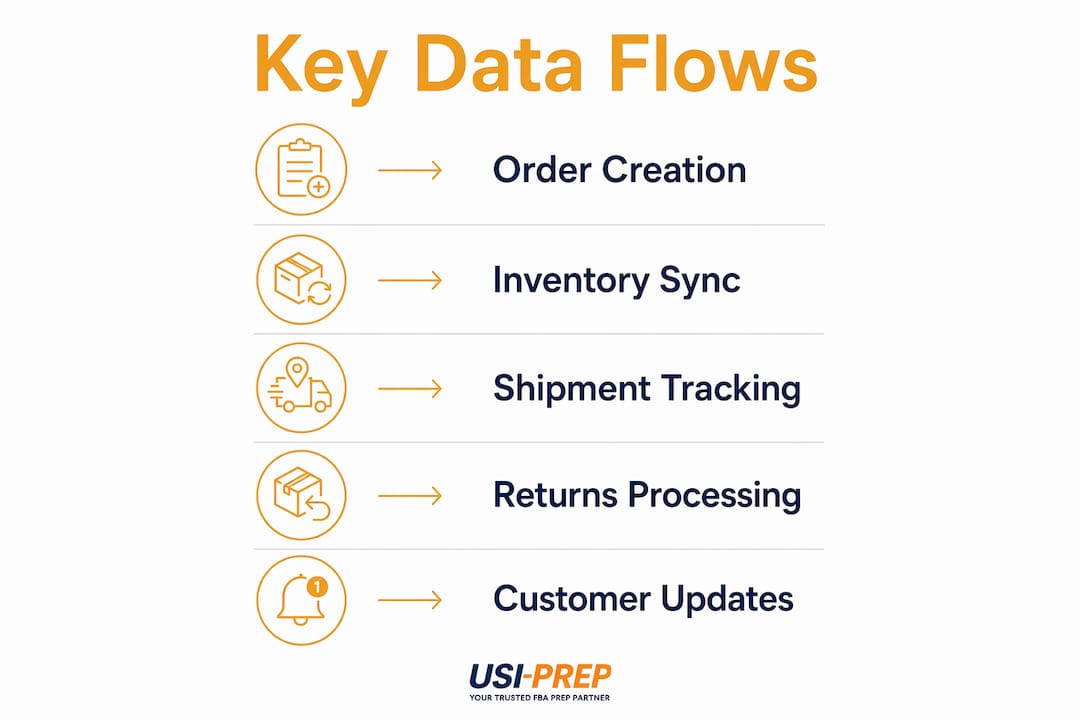
| Data Flow | Key Fields to Map |
|---|---|
| Order creation | Order ID, SKU/ASIN, qty, ship-to address, service level |
| Payment capture / hold | Payment status, hold reason, order priority flag |
| Pick/pack/ship | Carrier, tracking number, ship date, package weight/dims |
| Tracking update | Tracking number, carrier status, estimated delivery date |
| Inventory level change | SKU, location ID, available qty, reserved qty, backordered qty |
| Returns / RMA | RMA ID, SKU, return reason, unit condition, restocking flag |
| FBA prep flags | Prep type (bubble wrap, poly bag, label), ASIN, shipped-to Amazon DC |
Tricky mappings to get right before go-live: bundle/kit SKUs that must explode into component units, multi-SKU orders that split across fulfillment locations, address normalization for carrier compliance, and Amazon FBA label requirements that differ by ASIN category. Clean product metadata upstream makes all of this easier. Tools like MerchUp help standardize product descriptions and SKU data before it hits your integration layer.
How do you connect your store to a fulfillment system technically?
Prefer prebuilt connectors when they exist. Use APIs and webhooks for custom flows. Add middleware when you’re orchestrating multiple systems. Reserve EDI for legacy enterprise partners who require it.

Shopify’s app ecosystem offers hundreds of prebuilt connectors to fulfillment platforms, carriers, and 3PLs, which cuts developer time and gets a pilot running in days rather than weeks. ShipStation, for example, centralizes orders, inventory, carriers, and delivery data into one platform with automation rules that reduce manual clicks across the fulfillment workflow.
Direct API and webhook integrations give you the most control. Webhooks push events (order placed, order shipped, inventory updated) in real time without polling. Amazon FBA’s API adds a layer of complexity: you need to handle shipment creation, label generation, and inbound shipment status separately from your standard order flow.
Middleware and iPaaS tools (think Celigo, Boomi, or MuleSoft) sit between systems, transforming payloads, handling retries, and routing data when you have more than two systems talking to each other. They add cost but dramatically reduce custom development when you’re connecting a Shopify storefront, an ERP, and a 3PL simultaneously.
Pro Tip: For U.S. operations, use OAuth 2.0 or API key authentication with IP allowlisting. Never pass order data over unencrypted connections, and confirm your fulfillment partner’s data handling practices comply with your customer data obligations under applicable U.S. state privacy laws.
Step-by-step implementation checklist and realistic timeline
The answer-first version: plan for 6–10 weeks from kickoff to full production for a mid-complexity integration. Rushing the testing phase is where most brands create the customer-facing problems they were trying to avoid.
- Discovery (Week 1–2): Identify all stakeholders (ops, IT, finance, CS), document current systems, and select 5–10 test SKUs including a bundle, a return, and an FBA-prep item.
- Field mapping (Week 2–3): Build the field-level mapping document covering every data flow in the table above. Define transformation rules for address normalization and SKU aliases.
- Sandbox/staging testing (Week 3–5): Run end-to-end test cases: paid order, hold/cancel, return with RMA, FBA prep order to Amazon. Confirm tracking numbers appear in the storefront within your SLA window.
- Pilot (Week 5–7): Go live on one low-volume SKU or one geographic region. Run daily SKU-level reconciliation. Acceptance criteria: zero inventory drift, zero duplicate orders, tracking updates within 2 hours of ship event.
- Reconciliation review (Week 7–8): Compare fulfillment system records against storefront orders line by line. Resolve any SKU mismatches or status gaps before expanding.
- Full rollout and go-live (Week 8–10): Notify customers of any service window, activate rollback plan, and confirm exception dashboards are live before cutting over full volume.
Order management best practices recommend assigning a single internal owner for reconciliation from day one. Without that, discrepancies accumulate silently until they surface as customer complaints.
What does integration cost, and what ROI should you expect?
Integration costs come from four buckets: one-time setup (connector configuration, developer hours for API work), recurring platform fees (middleware subscriptions, fulfillment software licenses), per-order fulfillment fees, and ongoing monitoring and support. Fulfillment cost components vary by volume, carrier mix, and whether you’re using a managed 3PL or running your own warehouse.
The savings side is where the math gets interesting. Usiprep’s case studies show brands achieving roughly 30% lower fulfillment costs after integrating with a managed partner, driven by automated rate-shopping, fewer reshipping events, and reduced manual labor hours. Vendor-managed compliance also reduces chargeback and compliance fine exposure, which can be a significant hidden cost for brands selling through retail channels or Amazon.
To model break-even: estimate your current cost per exception (reship, manual correction, customer service contact) and multiply by monthly order volume. Even a 5% reduction in exception rate on 2,000 orders per month adds up fast. For cost reduction strategies beyond integration, carrier diversification and zone-skipping are the next levers to pull.
Common integration failures and how to fix them
Most integration problems trace back to one of five root causes. Knowing them in advance means you catch them in staging, not in production.
- SKU mismatches: Your storefront SKU doesn’t match the fulfillment system’s item code. Fix: build a canonical SKU map before any data flows and validate it against every product variant. Fulfillment errors from SKU drift are among the most common and most preventable.
- Inventory drift: Available quantity in the storefront diverges from the warehouse count over time. Root cause: lagged sync or missing “reserved” status mapping. Fix: sync all three inventory states (available, reserved, backordered) not just total on-hand.
- Duplicate orders: A webhook fires twice, or a retry logic error creates two fulfillment records for one order. Fix: implement idempotency keys on every order creation call.
- Address mapping errors: Carrier rejects the ship-to address because of formatting differences. Fix: run all addresses through a normalization service (USPS Address Validation API) before passing to the carrier.
- RMA mismatch: A return is initiated in the storefront but the fulfillment system never receives the RMA record, so the unit sits in a returns queue without being restocked. Fix: automate RMA creation at the moment the customer initiates a return, not after the physical unit arrives.
Pro Tip: Set up a daily reconciliation script that compares order counts, shipped counts, and inventory levels between systems. A simple exception dashboard with alert thresholds (more than 1% order discrepancy, inventory delta above 5 units) catches drift before it compounds.
How do you evaluate a fulfillment partner for integration and FBA prep?
A qualified partner must demonstrate four things before you sign anything: documented API or webhook support with a sandbox environment, a field-mapping guide you can review, a clear SLA on on-time delivery, and verifiable FBA prep experience with Amazon’s current requirements.
Score candidates on these criteria: integration capability (can they share sample API docs and test credentials?), FBA labeling and prep experience (do they know FNSKU vs. manufacturer barcode rules?), geographic footprint relative to your customer base, reporting and visibility (can you see order status without calling them?), and support SLA (what’s their response time for a production issue at 2 AM on a Monday?).
Questions to ask on a discovery call:
- Can you give us sandbox access before we commit?
- What does your reconciliation report look like? Can we see a sample?
- How do you handle FBA prep rule changes from Amazon?
- What’s your disaster recovery plan if your WMS goes down during peak season?
Red flags that should end the conversation: No sandbox environment. Vague answers about field mapping (“we’ll figure it out during onboarding”). No sample reconciliation data. No documented Amazon FBA-specific processes. Any partner who can’t show you a test environment before you sign is asking you to trust a system you’ve never seen run.
For a deeper look at what separates a reliable 3PL from a risky one, the 3PL provider guide covers the structural questions worth asking.
Usiprep handles integration and FBA prep for U.S. sellers
Significant fulfillment cost savings and a very high on-time delivery rate aren’t marketing claims Usiprep invented. They’re the results brands see when they move from a disconnected, manual workflow to a fully integrated fulfillment partner that was built by people who sold on Amazon themselves.
Usiprep manages the full integration workflow for U.S. ecommerce brands: data mapping, sandbox testing, FBA prep and labeling, and ongoing reconciliation. You don’t need to hire a developer to get started. The onboarding process is designed to get your first orders flowing through the integrated system within days, not months. FBA prep compliance is built in, including FNSKU labeling, poly bagging, and shipment creation to Amazon’s current inbound requirements. Check the FBA prep requirements checklist to see exactly what Usiprep handles on your behalf.
Ready to stop managing fulfillment manually? Review Usiprep’s pricing or request a pilot to see the integration in action with your own SKUs.
Key Takeaways
Integrating fulfillment software with your ecommerce store requires a prebuilt connector or API, a complete SKU map, and a tested RMA workflow before you go live with full order volume.
| Point | Details |
|---|---|
| Pick the right architecture | Under 500 orders/day, a 3PL/fulfillment app is the fastest and most cost-effective path. |
| Map all inventory states | Sync available, reserved, and backordered quantities, not just total on-hand, to prevent drift. |
| Test before you scale | Run 5 end-to-end scenarios in staging, including a return and an FBA prep order, before full rollout. |
| Track two metrics first | Inventory accuracy and on-time ship rate tell you whether integration is working within the first 30 days. |
| Usiprep as a managed option | Usiprep delivers a 98.9% on-time delivery rate and roughly 30% lower fulfillment costs for brands using its integrated fulfillment and FBA prep service. |
Why a pilot integration beats a big-bang rollout every time
The conventional advice is to plan thoroughly and then launch. The smarter move is to plan, then run a small pilot that proves your plan wrong in the cheapest possible way.
A two-week pilot on a single SKU or a single region will surface mapping edge cases your documentation missed, carrier rules that don’t behave the way the API docs say they do, and FBA prep labeling gaps that would have caused Amazon to reject an entire inbound shipment. Those are exactly the problems you want to find before they hit 2,000 orders.
The pilot should be owned by one person internally, ideally someone who sits between operations and technology and can escalate both a data mapping error and a warehouse process question. Usiprep, founded by former Amazon sellers, structures onboarding as a phased pilot precisely because the edge cases in FBA prep and order routing are where integrations fail. Starting small isn’t caution. It’s the fastest route to a system you can actually trust at scale.
Useful resources for implementation and next steps
For technical teams:
- Shopify fulfillment app ecosystem and connector docs: Start here if your storefront is Shopify and you want prebuilt options.
- Amazon FBA prep requirements checklist: The current labeling, packaging, and shipment creation requirements for U.S. sellers.
- ShipStation integration overview: Useful for understanding multi-carrier automation and order centralization before choosing a platform.
- UPS Supply Chain connectivity options: API, shopping cart connectors, and EDI options for distributed order management.
For operations teams:
- Ecommerce fulfillment overview: A clear starting point if you’re mapping your current process before choosing a system.
- FBA shipment checklist: Step-by-step guide to pair with your integration testing for Amazon-bound shipments.
- How to speed up FBA prep: Operational playbook for accelerating FBA prep throughput once integration is live.
If you want a vendor-managed option: Usiprep’s homepage is the right starting point. The team handles integration setup, FBA prep compliance, and ongoing reconciliation so your operations team isn’t managing the technical layer.