
Walmart Marketplace is a professional B2C platform where sellers pay no subscription fees and instead pay per-transaction referral fees, while choosing between self-fulfillment or Walmart Fulfillment Services (WFS). Three things determine whether you succeed operationally:
- Fees: Referral rates run 6%–15% depending on product category and sale price, with no monthly or setup costs.
- Eligibility and product data: You need a Business Tax ID (SSNs not accepted) and GS1-certified GTIN/UPC codes for every product.
- Fulfillment: You must operate a returns-capable B2C U.S. warehouse that meets Seller Performance Standards, or enroll in WFS.
If you have those three covered, you’re ready to apply in Walmart Seller Center. If your logistics aren’t returns-capable yet, evaluate WFS or a U.S. 3PL before you apply.
Table of Contents
- How Walmart Marketplace works: platform model and order flow
- What Walmart charges and how long onboarding takes
- Who qualifies to sell and what documents you need
- Self-fulfillment vs. Walmart Fulfillment Services: which fits your operation?
- Seller performance standards, the Buy Box, and the Pro Seller Badge
- How to get started: step-by-step onboarding and operational checklist
- Scaling on Walmart: advertising, pricing, and peak-season planning
- Common risks and how to stay compliant
- Key Takeaways
- Why fulfillment operations decide your Walmart outcome
- Usiprep helps Walmart sellers meet fulfillment requirements from day one
- Useful sources and official documentation
How Walmart Marketplace works: platform model and order flow
Walmart Marketplace connects third-party sellers to Walmart.com shoppers, with the seller controlling inventory and pricing while Walmart handles the storefront and customer trust layer. The order flow is straightforward once you understand where your systems must plug in.
Order lifecycle:
- Customer browses and purchases on Walmart.com.
- The order routes to your Seller Center dashboard or connected API.
- You (or WFS) pick, pack, and ship within your stated transit window.
- Tracking updates sync back to Walmart and the customer.
- Returns are processed through your warehouse or WFS, depending on your setup.
Integration touchpoints you must support:
- Inventory sync: Keep stock counts accurate to avoid cancellations, which hurt your order defect rate.
- Order ingestion: Via Seller Center manually, flat-file upload, API connection, or a solution provider.
- Shipping and returns addresses: Must be a verifiable U.S. B2C location.
- Settlement: Walmart pays out through your connected third-party payment processor on a scheduled basis.
What Walmart charges and how long onboarding takes
Signing up is free. Walmart charges only referral fees per transaction, no monthly subscription, no listing fees.
| Category type | Referral fee range | Example: $50 sale |
|---|---|---|
| Most general merchandise | 8%–15% | — |
| Electronics and accessories | 6%–8% | — |
| Apparel and footwear | 10%–15% | $5.00 |
On a $50 sale in a 10% category, Walmart keeps $5.00. You keep $45.00 before your own fulfillment and shipping costs.
Onboarding timeline checkpoints:
- Business verification: a few minutes to several business days, depending on documentation.
- Payment setup window: 30 days from account creation. Miss it and the account is declined, requiring re-application.
- New Seller Payment Hold: applied after your first sales to build credibility; length varies by country of incorporation.
- Account finalization: up to four hours after you add your first inventory.
- WFS billing verification: two to three business days once WFS setup is initiated.
Stat callout: The 30-day payment-setup deadline is the single most common reason new seller accounts are declined. Calendar it on day one.
Who qualifies to sell and what documents you need
Walmart Marketplace is for professional sellers whose assortments complement Walmart’s own inventory. Consumer accounts and sole proprietors using SSNs don’t qualify.
Required documents and data:
- Copy of a personal government-issued ID
- Business Tax ID or Business License Number (no SSNs)
- Business entity classification and supporting documents verifying your business name and address
- Demonstrated history of marketplace or eCommerce success
- GS1 GTIN/UPC codes with a GS1 Company Prefix for all products
- Catalog that complies with Walmart’s Prohibited Products Policy
- A returns-capable B2C U.S. warehouse or WFS enrollment
Catalog requirements to clear before applying:
- Product images must meet Walmart’s content quality standards (white background, minimum resolution).
- Descriptions must be accurate and complete, no keyword stuffing or misleading claims.
- Prohibited categories include certain weapons, hazardous materials, and age-restricted products. Review Walmart’s Prohibited Products Policy before building your catalog.
Pro Tip: Get your GS1 GTIN/UPCs from gs1.org directly. Third-party resellers sell cheaper codes that Walmart’s system may reject, stalling your listing process.
Self-fulfillment vs. Walmart Fulfillment Services: which fits your operation?
The core trade-off is control versus simplicity. Self-fulfillment gives you flexibility and potentially lower per-unit costs if you already have capable infrastructure. WFS gives you a 2-day shipping SLA and hands off returns and customer support to Walmart.

| Dimension | Self-fulfillment | Walmart Fulfillment Services (WFS) |
|---|---|---|
| Shipping SLA | You set transit times; must be competitive | 2-day delivery handled by Walmart |
| Returns handling | Your B2C warehouse must accept and process returns | WFS handles all returns |
| Customer support | Your responsibility | WFS handles for enrolled items |
| Inventory routing | Ship direct from your warehouse | Send inbound to WFS fulfillment centers |
| Tech integration | API, flat-file, or Seller Center | WFS-specific labeling and inbound rules |
| Cost shape | Variable; depends on your 3PL or warehouse costs | Per-unit WFS fees plus storage |
Self-fulfillment pros and cons:
- ✓ Full control over packaging, branding inserts, and handling
- ✓ Works well if you already have a capable 3PL relationship
- ✗ You absorb all returns logistics complexity
- ✗ Hitting 2-day SLAs requires a strategically located warehouse
WFS pros and cons:
- ✓ Automatic 2-day badge, which lifts Buy Box eligibility
- ✓ Returns and customer support handled by Walmart
- ✗ Requires inbound shipments to WFS centers with specific labeling
- ✗ Less flexibility on packaging and branding
Pro Tip: If you lack a returns-capable B2C warehouse, a U.S. 3PL that understands Walmart’s requirements is often faster to onboard than building that capability in-house. See the Walmart fulfillment requirements checklist for what your warehouse must support.
Seller performance standards, the Buy Box, and the Pro Seller Badge
Buy Box placement and the Pro Seller Badge are not marketing perks. They are direct outputs of your operational metrics. Walmart measures three core dimensions:
- On-time delivery rate: Orders shipped and delivered within your stated transit window.
- Order defect rate: Cancellations, late shipments, and customer complaints combined.
- Response rate: How quickly you respond to customer messages.
WFS orders tend to score well on delivery and defect metrics because Walmart controls that fulfillment leg. For self-fulfilled sellers, those numbers depend entirely on your warehouse and carrier performance.
Practical steps to protect your metrics:
- Set transit times you can actually hit, not aspirational ones.
- Use Walmart’s automated pricing tool to stay competitive without manual updates.
- Monitor your Seller Scorecard in Seller Center weekly, not monthly.
- Respond to customer messages within 24 hours, ideally faster.
- Keep inventory counts accurate to prevent oversell cancellations.
The Pro Seller Badge signals trust to shoppers and feeds into search ranking. Treat your SLAs as a visibility investment, not just a logistics checkbox.
How to get started: step-by-step onboarding and operational checklist
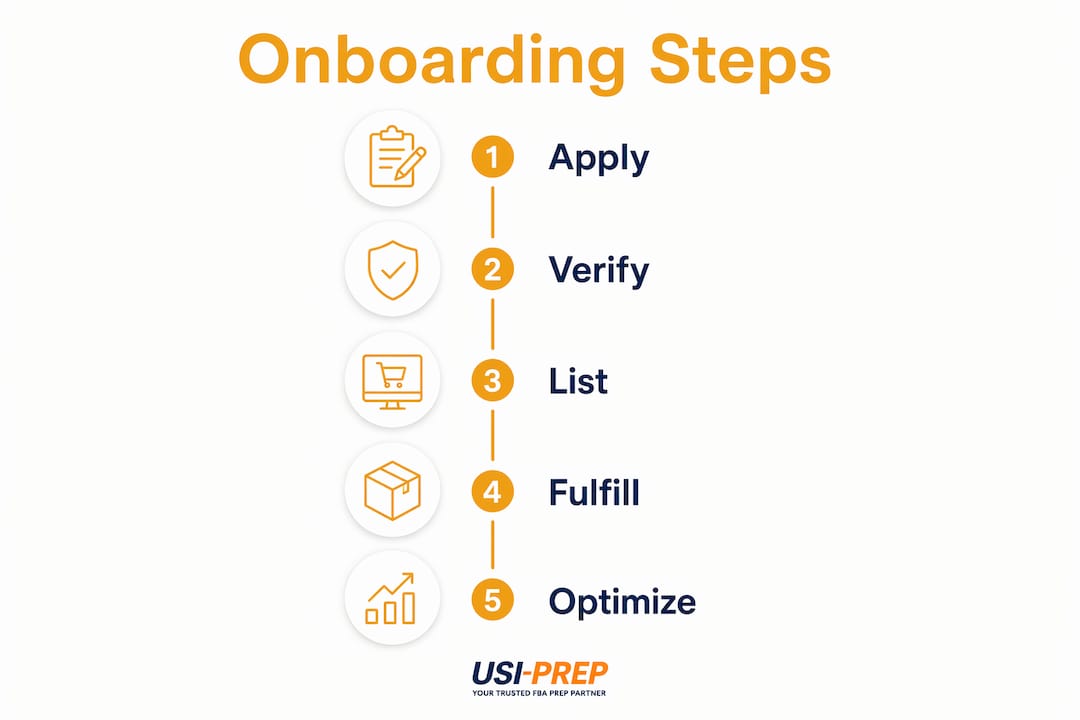
The onboarding sequence is: apply → verify business → set up payments → configure shipping and returns → build catalog → go live.
- Create your account at seller.walmart.com using a business email. The signup itself takes minutes.
- Verify your business by submitting your entity type, tax registration (must match IRS records exactly), and a government-issued personal ID.
- Set up your payout method by connecting a third-party payment processor through the Payments section in Seller Center. Complete this within 30 days.
- Add market details: business display name, customer service email, and phone number.
- Configure shipping and returns: set your shipping profile, transit times, and returns policy. Confirm your warehouse address is a verifiable U.S. B2C location.
- Build your catalog: use Express setup via Versori to import from another marketplace, connect via API, or upload via flat-file or Seller Center’s bulk upload tool. Walmart’s AI-powered listing tool can speed up single and bulk item setup.
- Prepare GTIN/UPCs: every product needs a valid GS1-issued code before listing.
- Go live and run a test order before peak season to validate your full fulfillment and returns workflow.
Common pitfalls to avoid:
- Entering business information that doesn’t exactly match your IRS records causes verification delays.
- Missing the 30-day payment setup window closes your account automatically.
- Uploading listings without valid GTINs stalls your catalog.
Pro Tip: Run at least one test order before your first promotional push. A returns workflow that breaks during peak season is far more expensive to fix than one caught in a quiet week.
Scaling on Walmart: advertising, pricing, and peak-season planning
Three levers drive growth once you’re live: Walmart Connect advertising, automated pricing, and fulfillment capacity planning.
Advertising formats through Walmart Connect:
- Sponsored Products: appear in search results and category pages; best for demand capture on proven SKUs.
- Sponsored Brands: promote your brand at the top of search; useful once you have a catalog with depth.
Walmart’s seller diagnostics tool (formerly Biz Mentor) analyzes your price, inventory, and conversion data in real time and flags catalog gaps and improvement opportunities. Use it before scaling ad spend.
Peak-season operational checklist:
- Build inventory buffers 6–8 weeks before major sales events.
- Confirm WFS inbound cut-off dates from the Walmart Marketplace Playbook.
- Align your ad budget with your in-stock position. Advertising a product you can’t fulfill burns money and damages your defect rate.
Pro Tip: Coordinate your Walmart Connect spend with your fulfillment SLA. An ad that drives a click to an out-of-stock listing or a slow-ship offer loses the Buy Box to a competitor who planned their inventory better.
Common risks and how to stay compliant
The top risks that trigger account issues are fulfillment failures, incorrect product data, and missed payment setup requirements.
Red flags that hurt your account:
- High cancellation rates from overselling or inventory sync failures
- Missing or invalid GTIN data on listings
- Inconsistent transit times that inflate your late-shipment rate
- Business verification documents that don’t match your IRS records exactly
- Listing products in prohibited or restricted categories without checking Walmart’s policy
Best practices to stay clean:
- Sync inventory in real time; batch updates create lag that causes oversells.
- Test your returns workflow before going live, not after your first return arrives.
- Build buffer lead time into WFS or 3PL inbound shipments, especially before peak periods.
- Keep your payment processor account active and linked; an expired connection interrupts payouts.
- Review Walmart’s Prohibited Products Policy before adding new categories to your catalog.
Key Takeaways
Walmart Marketplace rewards sellers who treat logistics as a visibility strategy, not an afterthought: referral fees of 6%–15%, strict performance standards, and a 30-day payment deadline define the operational floor.
| Point | Details |
|---|---|
| No subscription fees | Walmart charges 6%–15% referral fees per transaction; no monthly or setup costs. |
| 30-day payment deadline | Miss the payment setup window and your account is declined; re-application required. |
| Returns capability is mandatory | Self-fulfilled sellers must operate a returns-capable B2C U.S. warehouse or enroll in WFS. |
| Performance drives visibility | On-time delivery, defect rate, and response rate determine Buy Box placement and Pro Seller Badge eligibility. |
| Usiprep for logistics readiness | Usiprep’s 3PL services cover returns handling, Walmart-ready labeling, and fast inventory check-in for sellers who need compliant U.S. fulfillment infrastructure. |
Why fulfillment operations decide your Walmart outcome
Most sellers focus on their catalog and pricing when they apply to Walmart Marketplace. That’s the wrong priority. Operational reliability, specifically fast shipping and frictionless returns, is what Walmart’s algorithm actually rewards with Buy Box placement and the Pro Seller Badge.
The Seller Performance Standards exist because Walmart is protecting its own customer experience. When your on-time delivery rate slips, Walmart doesn’t just penalize you in search. It deprioritizes your listings in favor of sellers who can actually deliver. That’s a direct revenue consequence, not a warning.
Sellers who outsource to a capable 3PL with Walmart-specific experience, one that handles returns, meets parcel SLAs, and checks inventory in fast, tend to hit compliance metrics from day one rather than spending weeks correcting them. Usiprep’s 98.9% on-time delivery rate and 30% reduction in fulfillment costs for brands it works with are the kind of numbers that translate directly into Pro Seller Badge eligibility and sustained Buy Box wins.
Usiprep helps Walmart sellers meet fulfillment requirements from day one
Sellers who lack returns-capable B2C infrastructure before applying to Walmart Marketplace face a hard choice: build it or outsource it. Usiprep is the faster path. Founded by former Amazon sellers, Usiprep handles the exact logistics requirements Walmart demands: returns processing, Walmart-ready labeling, fast inventory check-in, kitting, and API integrations with major eCommerce platforms.
Specific services relevant to Walmart sellers include:
- Returns handling: Usiprep’s warehouse accepts and processes customer returns to keep your defect rate clean.
- GTIN/UPC prep and labeling: Products arrive shelf-ready and compliant with Walmart’s content standards.
- Fast inventory check-in: Faster inbound processing means less time between shipment and live inventory.
- Platform integrations: Connect your Walmart Seller Center account directly for real-time inventory sync.
If you’re evaluating whether to self-fulfill or need a 3PL vs. self-fulfillment comparison before committing, Usiprep’s transparent pricing makes the cost math straightforward. Get a quote and confirm your fulfillment setup is Walmart-ready before you apply.
Useful sources and official documentation
- Walmart Marketplace seller requirements and how it works: The official pre-application checklist covering eligibility, required documents, and the platform model. Read this before you apply.
- Complete onboarding in Seller Center: Step-by-step guide to the five onboarding stages, payment setup deadlines, and WFS billing verification timelines.
- Beginner’s guide to selling on Walmart Marketplace: Covers the platform model, referral fees, fulfillment options, and advertising tools in one place.
- Walmart Marketplace Roadmap for Success: Explains Seller Performance Standards, the Pro Seller Badge, and the seller diagnostics tool.
- Seller registration step-by-step guide: Walks through each onboarding step from account creation to catalog setup, including catalog import options.
- GS1 US (gs1.org): The only legitimate source for GTIN/UPC codes with a GS1 Company Prefix. Walmart’s system validates against GS1’s database.
- Walmart Prohibited Products Policy: Review before building your catalog. Listing a prohibited item is grounds for account suspension.