
An order management system (OMS) is software that centralizes and automates the entire customer order lifecycle, from the moment a buyer clicks “purchase” through fulfillment, shipping, and returns. If you’re selling on two or more channels, hitting triple-digit daily orders, or working with a 3PL, an OMS is the infrastructure layer that keeps everything from unraveling.
TL;DR: An OMS is the coordination brain between your sales channels and your fulfillment operations. Before you buy one, map your channels and inventory, then confirm your 3PL supports real-time API connections.
- Evaluate OMS features against your actual channel mix (Amazon, Shopify, Walmart, etc.)
- Confirm 3PL API compatibility before committing to any platform
Table of Contents
- What does an order management system actually do?
- How an OMS differs from a WMS and a fulfillment center
- Why marketplace sellers need an OMS
- How an OMS integrates with 3PLs, marketplaces, and platforms
- Key features to look for when evaluating an OMS
- What does OMS implementation cost, and how long does it take?
- Which OMS deployment model fits your operation?
- Questions to ask OMS vendors and prospective 3PLs
- Key Takeaways
- The part most sellers get wrong about OMS adoption
- Usiprep handles the fulfillment side so your OMS has a reliable partner
- Useful resources for further reading
What does an order management system actually do?
The short answer: it replaces the spreadsheet chaos. The longer answer covers five distinct workflows.
Order capture and normalization pulls orders from every channel — marketplaces, your own storefront, even phone orders — and converts them into a single, consistent format. No more logging into Seller Central, then Shopify, then eBay separately.
Real-time inventory sync maintains one authoritative count per SKU across every warehouse and sales channel. When a unit sells on Amazon, the count drops everywhere else instantly. That single source of truth is what prevents oversells.
The next layer is order orchestration and routing, sometimes called distributed order management. The OMS evaluates each order and decides which fulfillment location handles it based on proximity, stock availability, or cost rules. Distributed order management routes orders to the closest fulfillment location, cutting transit time and shipping cost simultaneously.
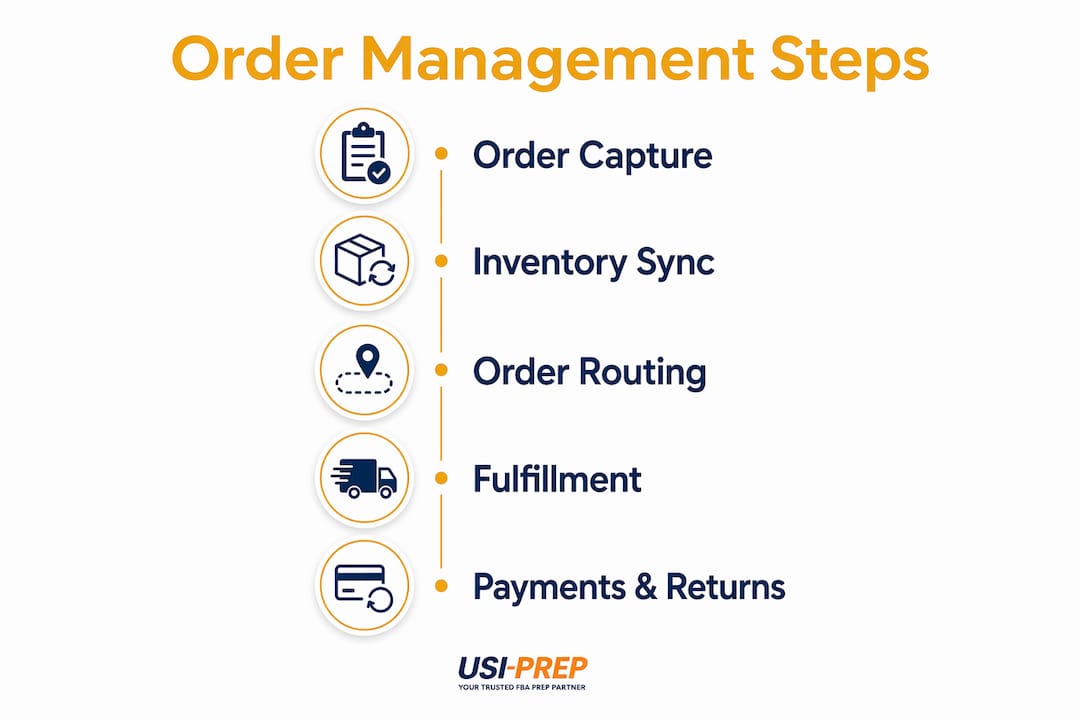
After routing, the OMS hands the order off to your WMS or 3PL and then pulls tracking data back into your storefronts and customer-facing communications. Buyers get automated shipping updates without your team touching a single ticket.
Finally, the OMS handles payments, invoicing, returns, and reporting. Returns get processed against defined rules, refunds flow back to the customer, and dashboards surface the metrics that actually matter: fill rate, order cycle time, return rate by SKU.
How an OMS differs from a WMS and a fulfillment center
Most sellers confuse these three, and the confusion costs them during vendor selection.
A fulfillment center (or 3PL) is the physical operation: people, shelves, conveyors, and trucks. It picks, packs, and ships. A warehouse management system (WMS) runs the floor of that facility — directing pickers, managing bin locations, and recording every movement of physical inventory. Oracle and other practitioners distinguish the OMS as the orchestration layer connecting storefronts to warehouses, sitting above both.
Put simply: the OMS decides which fulfillment center handles an order. The WMS executes the pick, pack, and ship inside that facility. The fulfillment center is the physical space where it all happens. They’re complementary, not interchangeable. For a deeper look at what happens inside a fulfillment center, the role of warehouse in ecommerce guide covers the WMS side in detail.

Pro Tip: Before connecting any OMS to a WMS or 3PL, standardize your SKU naming and inventory counts first. If your data is inconsistent across platforms, the OMS will automate and amplify those errors at scale.
Why marketplace sellers need an OMS
The most immediate pain point an OMS solves is the oversell. Selling on Amazon and Shopify simultaneously with separate inventory pools means a single popular SKU can sell twice from the same unit. Marketplaces penalize oversells with order cancellation metrics that damage your seller account health. Centralizing inventory removes those siloed platform data gaps.
Beyond that, automated tracking updates and returns handling turn order management into a competitive advantage that drives repeat purchases and lowers support costs. Fewer “where’s my order?” tickets means your customer service team handles exceptions, not routine status checks.
Intelligent routing also cuts shipping spend. When the OMS sends an order to the nearest stocked warehouse instead of defaulting to one location, transit time drops and carrier costs follow. For high-volume sellers, that routing logic alone can justify the platform cost.
A non-obvious point: growing sellers often see OMS return on investment earlier than large retailers do, because automation eliminates the manual reconciliation that causes oversells and canceled orders on marketplaces before the problem compounds.
How an OMS integrates with 3PLs, marketplaces, and platforms
Integration quality is where OMS implementations succeed or fail. The four common methods are:
- API (REST/JSON): Real-time, bidirectional. Your OMS pushes orders to the 3PL and pulls shipment confirmations back within seconds. This is the gold standard for live inventory visibility.
- Webhooks: Event-driven API calls. The 3PL notifies your OMS the moment an order ships, rather than your system polling on a schedule.
- EDI: Older standard, common with large retailers and some legacy 3PLs. Reliable but slower and more expensive to set up.
- File drops (SFTP/CSV): The fallback when nothing else is available. Batch-based, so inventory sync lags by hours. Avoid if possible.
Your 3PL must support inventory APIs, shipment status updates, and ASN (advance shipping notice) confirmations for inbound receiving. 3PL-integrated OMS users find the most value when real-time API connections push inventory and tracking data back to customer-facing storefronts automatically.
Pro Tip: Before go-live, run a complete “happy path” test order through the full cycle — placement, routing, pick/pack, shipment confirmation, tracking update to storefront. Then run a return. Both paths must work cleanly before you flip the switch on live traffic.
For a practical checklist of what to verify when selecting a fulfillment partner, the fulfillment center features guide covers the integration requirements in detail.
Key features to look for when evaluating an OMS
Use this checklist to score candidates:
- Multi-channel order capture: Amazon, Shopify, Walmart, TikTok Shop, and any wholesale or B2B channels you run
- Real-time inventory sync: Sub-minute updates across all channels and warehouse locations
- Distributed order routing: Rules-based logic for assigning orders to the optimal fulfillment location
- Returns management: Automated return authorization, disposition rules, and refund processing
- Payments and refunds: Integration with your payment gateway and accounting tools
- Reporting and dashboards: Fill rate, order cycle time, return rate, and shipping cost per order
On the integration side, look for native connectors to Amazon Seller Central, Shopify, Walmart Marketplace, and your 3PL’s API. Native connectors are faster to deploy; a robust API or webhook layer is the fallback for custom setups.
Pricing models vary: per-order transaction fees, monthly subscription tiers, or enterprise licensing. Map the billing structure to your order volume before signing. A per-order model that looks cheap at 500 orders/month can become expensive at 10,000. For U.S.-based operations, also verify uptime SLAs (99.9% is a reasonable floor), data retention policies, and where customer data is hosted.
What does OMS implementation cost, and how long does it take?
Cost components typically include setup and integration fees, per-order transaction fees or a subscription, customization work, staff training, and 3PL integration engineering. The cost per order fulfillment benchmarks guide has current U.S. figures for comparison.
A realistic timeline for a mid-market seller:
- Discovery and data mapping: 2–4 weeks (channel audit, SKU standardization, integration scoping)
- Integration and testing: 4–8 weeks (API connections, test orders, edge-case handling)
- Pilot and go-live: 2–4 weeks (one channel live, monitor, then expand)
What extends timelines: legacy ERP integrations, custom carrier rules, multi-warehouse complexity, and incomplete SKU data going in. The last one is the most common delay.
ROI signals to watch: hours saved on manual reconciliation, reduction in canceled orders, and shipping cost per order. Sellers who route intelligently across two or more fulfillment locations typically see measurable shipping cost reductions within the first quarter.
Pro Tip: Go live on your lowest-volume channel first. It limits blast radius if something breaks and gives your team time to learn the system before peak season hits.
Which OMS deployment model fits your operation?
SaaS cloud OMS is the right starting point for most ecommerce sellers. Fast to deploy, subscription-based, and maintained by the vendor. Platforms like NetSuite, Shopify’s native order management, and purpose-built tools like Linnworks or Skubana fall into this category. Low upfront cost, predictable billing.
On-premises or hosted enterprise solutions make sense when you have complex compliance requirements, highly customized workflows, or an existing ERP that the OMS must sit inside. Higher total cost of ownership, longer implementation, but more control.
Hybrid OMS + ERP + WMS orchestration is where larger sellers land. The OMS handles order routing and channel logic; the ERP manages finance and accounting; the WMS runs the warehouse floor. Each system does what it does best, connected via APIs.
For sellers choosing between 3PL and self-fulfillment, the deployment model decision often follows: self-fulfillment sellers lean toward OMS + WMS; 3PL-reliant sellers need an OMS with strong external API support above all else. Manual order management works for very small businesses but becomes error-prone quickly at scale, which is the clearest signal that a SaaS OMS is overdue.
Questions to ask OMS vendors and prospective 3PLs
Operational:
- How do you handle split orders, backorders, and partial shipments?
- What is your SLA for inventory sync after a sale?
- How are returns routed and dispositioned?
Technical:
- What APIs and webhooks do you provide? REST or SOAP?
- How do you handle API rate limits and failed calls (retry logic)?
- Do you support ASN/receiving confirmations for inbound inventory?
Commercial:
- Break down your pricing: per-order fees, subscription, onboarding, and support tiers.
- What are the contract terms and exit clauses?
Compliance and data:
- Who owns the order and inventory data?
- Where is data hosted — U.S.-based servers?
- What is your backup frequency and disaster recovery SLA?
Key Takeaways
An OMS is the orchestration layer that connects your sales channels to your fulfillment operations, and sellers who adopt one before scaling to multiple channels avoid the oversell penalties and manual reconciliation that stall growth.
| Point | Details |
|---|---|
| OMS vs. WMS vs. 3PL | OMS routes orders; WMS runs the warehouse floor; the 3PL is the physical operation. |
| Standardize data first | Clean SKU data and consistent inventory counts before connecting any OMS to avoid amplifying errors. |
| API integration is critical | Confirm your 3PL supports real-time inventory and shipment APIs before selecting a platform. |
| Phase your go-live | Launch on your lowest-volume channel first to limit risk and train your team before peak season. |
| Usiprep as a 3PL partner | Usiprep offers API-ready fulfillment with a 30% cost reduction for many brands. |
The part most sellers get wrong about OMS adoption
The conventional wisdom says you need an OMS once you’re a “big” seller. That framing causes sellers to wait too long. The real trigger is not volume — it’s channel count. The moment you’re live on two or more marketplaces with shared inventory, manual reconciliation becomes a liability. Oversells on Amazon don’t just lose you a sale; they damage your seller metrics in ways that take months to recover.
The other mistake is treating OMS implementation as a software project rather than a data project. The platform is almost never the bottleneck. Inconsistent SKU naming across channels, inventory counts that don’t match between your 3PL and your storefront, item IDs that differ between your ERP and your WMS — those are what break implementations. Sellers who spend two weeks cleaning their data before touching the OMS go live faster and with fewer post-launch fires than sellers who rush the integration.
Change management matters too. Your customer service team needs to know which screens to check for order status. Your warehouse team needs to understand how routing decisions get made. A two-hour training session the week before go-live is not enough. Build a simple runbook, run a tabletop exercise with a sample return scenario, and designate one person per team as the OMS point of contact for the first 30 days.
Usiprep handles the fulfillment side so your OMS has a reliable partner
An OMS is only as good as the 3PL it’s connected to. Usiprep was built by former Amazon sellers who understand exactly what breaks when fulfillment data doesn’t flow cleanly between systems. The operation supports API-ready integrations with major ecommerce platforms, real-time inventory visibility, and multi-warehouse receiving — the infrastructure your OMS needs to route orders accurately and keep storefronts in sync.
Brands working with Usiprep report a high on-time delivery rate and notable reduction in fulfillment costs. The FBA prep requirements checklist is a good starting point if Amazon FBA is part of your channel mix. For a broader look at what the partnership covers, visit usiprep.com and request a discovery call to map your current order flow against what Usiprep’s fulfillment network can support.
Useful resources for further reading
- What Is Order Management? — Sage Advice US — vendor-agnostic explainer covering the full order lifecycle and OMS definition
- What Is Order Management — Oracle — practitioner-level breakdown of OMS vs. ERP vs. WMS roles
- 7 Benefits of Using an OMS — TechTarget — concise summary of CX and operational benefits
- What Is an OMS — NetSuite — covers distributed order management and 3PL integration patterns
- Ecommerce order management best practices — Usiprep’s operational playbook for U.S. sellers
- How fulfillment errors happen and how to stop them — practical diagnostic for reducing post-OMS implementation errors