
FNSKU is Amazon’s seller-specific barcode. You must download, print, and apply a scannable FNSKU to every unit you send to FBA, since Amazon ended its internal labeling service. Skip this and you’re looking at inbound defect fees, quarantined shipments, or outright rejection at the receiving dock. The action is simple; getting it right at volume is where sellers actually lose money.
TL;DR:
- Sellers must print and apply accurate FNSKU labels to every unit shipped to FBA, or risk inbound defect fees up to $5.72 per item.
- Proper label size is at least 1 inch by 2 and 5/8 inches, with Code 128 barcodes and human-readable text printed on non-reflective, adhesive labels.
- Labeling must fully cover the manufacturer’s UPC barcode, avoiding overlap or damage, and be verified with a scan before shipment.
- Using thermal printers for high volume or waterproof labels improves barcode clarity and reduces misreads, but check calibration regularly.
- Self-labeling is generally cost-effective for fewer than 3,000 units per month, while outsourcing reduces error-related costs for larger shipments.
Table of Contents
- What Is FNSKU Labeling and How Does It Differ From ASIN, SKU, and UPC?
- What Changed With Amazon’s 2026 Labeling Policy?
- What Are the FNSKU Label Size and Format Requirements?
- How Do You Print FNSKU Labels From Seller Central?
- What Printer and Label Stock Should You Use?
- Where Should FNSKU Labels Go, and How Do You Verify Them?
- Should You Self-Label or Outsource to a Prep Service?
- What Should You Require From Any Labeling Partner?
- What Do Sellers Get Wrong Most Often With FNSKU Labeling?
- How Usiprep Handles FNSKU Labeling for Growing Sellers
- Where Can You Verify FNSKU Requirements and Policy Updates?
- Sources
What Is FNSKU Labeling and How Does It Differ From ASIN, SKU, and UPC?
FNSKU stands for Fulfillment Network Stock Keeping Unit. Amazon generates this code specifically to link one physical unit to your seller account, and it’s what a warehouse associate scans the moment your box hits the receiving dock. The barcode format is Code 128, usually ten characters, often starting with the prefix “X00”.
It’s easy to confuse FNSKU with three other identifiers that look similar but do different jobs:
- ASIN: Amazon’s catalog identifier for a product listing, shared across every seller offering that item.
- SKU: your own internal inventory code, meaningless to anyone outside your business.
- UPC: the manufacturer’s barcode, printed on packaging before the product ever reaches Amazon.
- FNSKU: the label that ties a specific unit to your specific account inside Amazon’s fulfillment network.
There’s one exception worth knowing. If you hold Brand Representative status for a listing, Amazon may let you skip FNSKU stickers entirely and ship stickerless inventory using the manufacturer barcode instead. Everyone else, including resellers and wholesalers, needs FNSKU on every unit.
What Changed With Amazon’s 2026 Labeling Policy?
Amazon shut down its in-house FBA prep and labeling service in the United States, effective January 1, 2026. Before that date, sellers who skipped labeling could pay Amazon to do it on arrival. That option is gone now. You either label every unit yourself before it ships or hand that job to a prep partner.
The financial risk is real and immediate. A mislabeled standard-size unit can trigger inbound defect fees ranging from $0.32 to $1.74 per unit, and bulky items run as high as $5.72 each. Multiply that across a pallet of a few thousand units and a sloppy label run turns into a five-figure mistake fast.
The practical fix is straightforward: require scan-verification records from whoever applies your labels, whether that’s your own warehouse staff or a third-party prep provider. You remain liable for compliance either way, so proof of correct application matters more now than it ever did.
What Are the FNSKU Label Size and Format Requirements?
Amazon recommends a minimum label size of 1 inch by 2 and 5/8 inches (25 by 51 millimeters), which happens to match the standard Avery 5160 sheet label size many sellers already have on hand. The barcode itself needs to be Code 128 format, paired with the human-readable FNSKU text underneath so a receiving associate can manually key it in if a scanner ever fails.
A compliant label needs to check these boxes:
- Barcode centered and unobstructed, with no folds or wrinkles across the bars.
- Human-readable FNSKU text printed directly below the barcode.
- White, non-reflective label stock, since glossy or colored backgrounds can cause scan failures under warehouse lighting.
- Adhesive strong enough to survive conveyor belts, forklifts, and stacking without peeling.
Pro Tip: Order label stock rated for your storage conditions, not just your printer. A label that looks fine on your desk can lift at the corners after three weeks in a humid warehouse, and a lifted corner is enough to trigger a mis-scan.
How Do You Print FNSKU Labels From Seller Central?
Generating labels takes a few minutes once you know the path. Here’s the sequence:
- Log into Seller Central and go to Inventory > Manage Inventory, or open the relevant shipment plan if you’re mid-workflow.
- Select the units needing labels and click Print Item Labels.
- Choose your format: sheet labels for laser or inkjet printers, or continuous roll for a thermal printer.
- Set the label quantity to match your unit count exactly, plus a small buffer for misprints.
- Export as a PDF and print using the “actual size” or “100%” scale setting, never “fit to page,” which distorts barcode dimensions.
- Before running the full batch, print two or three sample labels and scan each one with a phone scanner app or handheld unit to confirm the code reads correctly.
- Check print resolution. Anything under 203 DPI on a thermal printer tends to blur the bars enough to cause misreads at high scan speeds.
That test-print step feels like an extra hoop, but it catches scaling errors before they become 500 unreadable labels sitting in a box.
What Printer and Label Stock Should You Use?
Your printer choice depends almost entirely on volume. Sellers shipping a few hundred units a month can usually get by fine on a laser or inkjet printer with sheet labels. Anyone printing thousands of units regularly should move to a dedicated thermal printer instead.
- Thermal printers (Zebra, Dymo, and Rollo are the common names in FBA prep rooms) handle roll-fed labels efficiently and produce sharp barcodes without ink cartridges to replace mid-run.
- Laser or inkjet with sheet labels works fine for low-volume sellers or oddly shaped packaging that doesn’t suit a roll format.
- Waterproof, thermal-transfer stock holds up far better than direct thermal paper if your inventory sits in a warehouse for weeks before shipping, since direct thermal images fade with heat and light exposure over time.
Whatever printer you land on, print quality checks matter more than the hardware itself. A reliable defense against inbound defects is keeping your unreadable-label rate under half a percent, which usually means recalibrating contrast settings every time you switch label stock brands.
Where Should FNSKU Labels Go, and How Do You Verify Them?
Placement mistakes cause more rejected inventory than bad printers do. The core rule: your FNSKU label must fully cover the manufacturer’s UPC or EAN barcode. Leave that original barcode visible, and a warehouse scanner might read the wrong code, creating a mismatch between what Amazon expects and what’s actually on the shelf.
- Apply the label to a flat section of the packaging, never across a seam, corner, or curved surface where the barcode could warp or crease.
- Center the label with enough clear margin on all sides for a scanner beam to catch it on the first pass.
- Confirm the underlying UPC is completely hidden, since a partially covered barcode causes double-scan errors at receiving.
- Run a handheld scan test on the first few finished units in every batch before moving on to the rest.
- Do a light peel-and-press check on a couple of samples to confirm the adhesive is bonding properly to that specific packaging material.
Pro Tip: If you’re labeling multiple SKUs in one session, finish one SKU completely before starting the next. Mixing SKUs mid-batch is how a wrong-FNSKU label ends up on the wrong product, and that mistake is invisible until Amazon rejects the shipment weeks later.
Should You Self-Label or Outsource to a Prep Service?
The math comes down to per-unit cost plus your tolerance for error. Self-labeling runs cheap on paper. Labels themselves cost roughly $0.015 each, plus whatever labor it takes to actually apply them by hand. A prep service or 3PL typically charges more per unit, often somewhere in the $0.20 to $0.50 range depending on the provider and your volume.
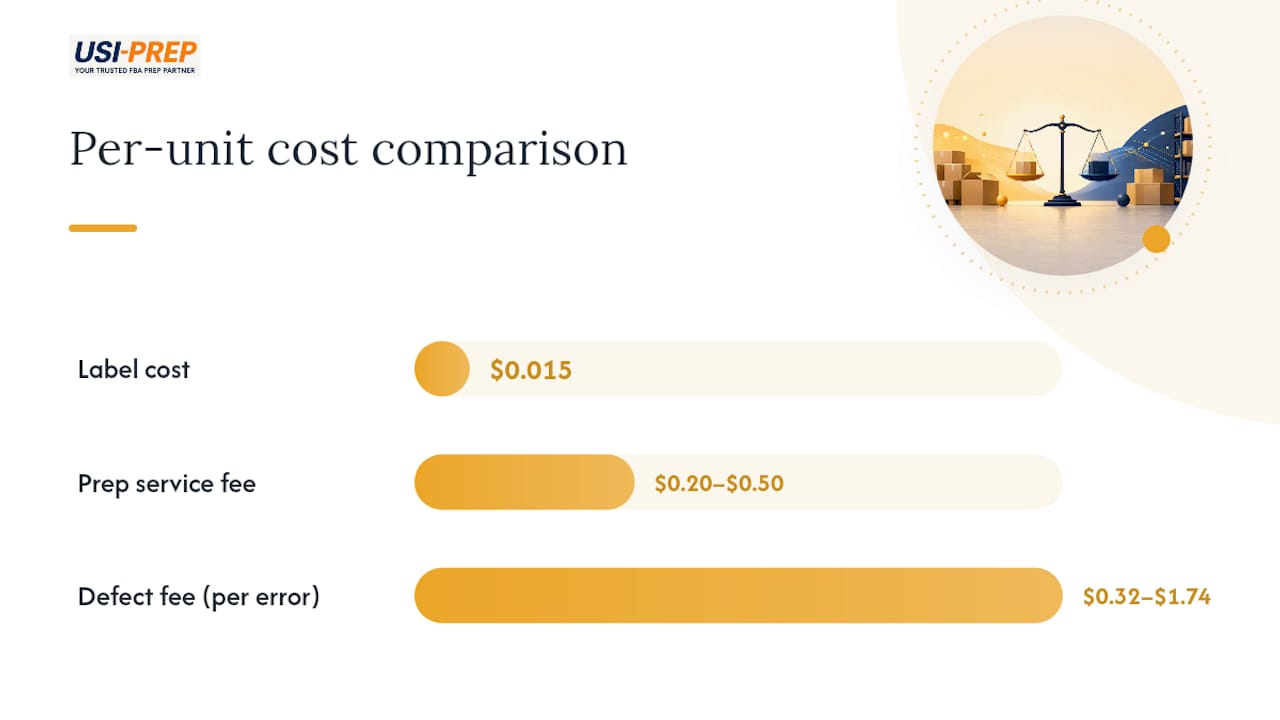
That gap looks obvious until you factor in error exposure. A single mislabeled unit can cost you $0.32 to $1.74 in defect fees, and if your in-house team is making mistakes on even 2% of a large shipment, those fees eat through the labor savings fast.
A few rules of thumb help here:
- Under roughly 3,000 units a month, self-labeling is usually cheaper even accounting for occasional errors.
- Above that volume, or if you’re seeing recurring inbound defects, a 3PL’s built-in quality control often pays for itself.
- If your team has no dedicated QA process, outsourcing removes a real liability, not just a task.
For a broader look at when outsourcing fulfillment makes sense beyond just labeling, 3PL Cowboy covers the strategic side of that decision well.
What Should You Require From Any Labeling Partner?
Whether you’re managing labeling in-house or handing it to a prep partner, the same operational controls apply. A tight checklist looks like this: sample-scan verification on every batch, itemized labeling logs tied to specific shipment IDs, and photos of completed pallets before they leave the warehouse.
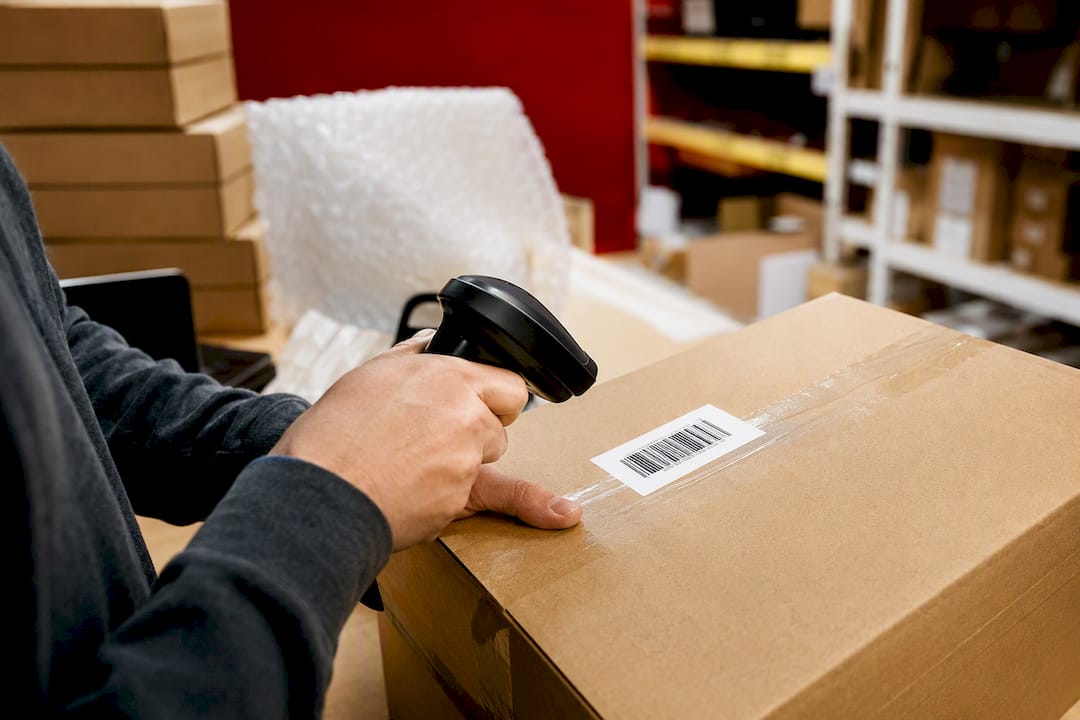
On the SLA side, ask for concrete numbers, not vague assurances. Usiprep builds its FBA prep workflow around exactly these controls, which is part of how it maintains a 98.9% on-time delivery rate for clients shipping high volumes into FBA. When the checklist exists on paper and gets followed at the scanner, inbound defects and receiving delays drop off almost entirely.
What Do Sellers Get Wrong Most Often With FNSKU Labeling?
The recurring mistake we see is rushing the print run without a sample check first, then discovering a scaling error only after 2,000 labels are already printed. A close second is mixing SKUs mid-batch under time pressure. Both are fixable before your next shipment: print three test labels, scan them, and finish one SKU before starting the next. Build the checklist habit now and defect fees mostly disappear.
— Akbar
How Usiprep Handles FNSKU Labeling for Growing Sellers
Usiprep exists for the seller who doesn’t want to gamble a shipment on a home printer and a Saturday afternoon. Every unit gets FNSKU-labeled with scan verification logged and photographed before it leaves the warehouse, so you have proof of compliance the moment Amazon asks for it.
If you’re shipping high volume, dealing with recurring inbound defects, or simply don’t have the labor hours to spare on manual labeling, that’s exactly who this service fits. Clients working with Usiprep see faster check-in times and roughly 30% lower fulfillment costs on average, without the guesswork of managing print quality themselves. Check the FBA prep requirements checklist to see exactly what’s included, and get a quote for your next shipment before your labeling backlog turns into a receiving delay.
Where Can You Verify FNSKU Requirements and Policy Updates?
Amazon’s own Seller Central help pages remain the final word on label specs and policy timing, since requirements shift periodically and third-party guides can lag behind. Check the FBA labeling requirements section directly in Seller Central before any large print run.
Beyond Amazon’s own documentation, Feedvisor’s FNSKU breakdown and Jungle Scout’s step-by-step barcode guide are worth bookmarking for quick reference on formatting and printing mechanics. For packaging rules that intersect with labeling, Usiprep’s guide on FBA packaging requirements covers the related specs sellers tend to overlook.
Sources
- FNSKU Explained: Amazon Barcode Requirements for 2026
- Amazon SP-API changelog: U.S. FBA prep and labeling services to end
- How to Print FNSKU Labels for Amazon FBA | LabelValue
- What is an Amazon FNSKU Barcode & How to Create One