
Yes, Shopify supports production-grade 3PL integrations, and most merchants get there through a certified fulfillment app or an OMS that talks to Shopify’s FulfillmentOrder and GraphQL Admin APIs. Either route cuts manual order entry, speeds up delivery, and gives you one place to track a shipment from warehouse to doorstep. The rest of this guide covers how to pick the right approach and implement it without breaking your order flow.
TL;DR:
- Most Shopify 3PL integrations rely on certified apps or APIs, with the FulfillmentOrder object being central to automated order processing via GraphQL.
- Proper setup requires mapping SKUs, defining routing rules, granting correct API scopes, and running test orders before going live to prevent costly errors.
- Integration failures commonly occur from address changes, stale inventory data, SKU mismatches, or unclear error ownership; automated alerts help manage these issues faster.
- Smaller volume merchants typically start with pre-built apps, while larger businesses benefit from middleware, OMS, or direct API integration, based on complexity and sales channels.
- Verifying vendor capabilities and understanding ownership of fulfillment issues in advance significantly reduces risk and improves ongoing sync reliability.
Table of Contents
- What Does a 3PL Actually Do for a Shopify Store?
- How Does a Shopify 3PL Integration Actually Work?
- Which Integration Method Fits Your Order Volume?
- What Should Be on Your 3PL Vendor Checklist?
- How Do You Set Up a Shopify 3PL Integration Step by Step?
- Why Do Shopify 3PL Integrations Break, and How Do You Fix It?
- How USIPrep Approaches Shopify Fulfillment Differently
- What Most Guides Get Wrong About Shopify Fulfillment
- Get Your Shopify Fulfillment Running Without the Guesswork
- Sources
What Does a 3PL Actually Do for a Shopify Store?
A third-party logistics provider, or 3PL, takes over the physical side of fulfillment: receiving your inventory, storing it, and shipping it out when an order comes in. For Amazon sellers, that often extends to FBA prep, meaning labeling, poly-bagging, and boxing units to Amazon’s exact specifications before they ever reach an Amazon warehouse. For direct-to-consumer Shopify brands, it means warehousing product, picking and packing each order, and handling the return when a customer sends something back.
Merchants outsource this work for a handful of concrete reasons:
- Scale without hiring. A 3PL absorbs order spikes during Black Friday or a viral TikTok moment without you adding seasonal staff.
- Geographic reach. Distributing inventory across multiple warehouse locations shortens transit times and often qualifies you for cheaper shipping zones.
- Lower per-unit cost at volume. Fixed warehouse rent and labor get replaced by variable, per-order fees that scale with your business instead of sitting idle in slow months.
- Faster delivery promises. A network of regional warehouses lets you offer two-day shipping without owning a single truck.
None of that comes free. You lose the direct hands-on control of packing your own orders, you’re locked into whatever service level agreement your 3PL offers, and you pay storage and handling fees whether or not that month is busy. Most merchants start feeling the pinch of self-fulfillment once their order volume grows beyond what a spare bedroom or garage can handle, and hiring a part-time packer becomes less cost-effective than outsourcing. Seasonal businesses often outsource earlier, since a 3PL absorbs the November spike that would otherwise require renting extra space for six weeks a year.
How Does a Shopify 3PL Integration Actually Work?
Shopify built its own answer to this problem with the Shopify Fulfillment Network, a system that connects merchants with vetted 3PL partners already wired into the Shopify admin. Instead of stitching together a custom connection yourself, you compare partner capabilities and monitor performance from the same dashboard you use to run the rest of your store.
Under the hood, every modern Shopify fulfillment integration runs on the same object: FulfillmentOrder. Think of it as the digital paper trail for a single shipment. When a customer places an order, Shopify generates a FulfillmentOrder and routes it to whichever location or partner is assigned to fulfill it. From there, the lifecycle typically looks like this:
- Shopify sends a REQUEST_FULFILLMENT action to the 3PL’s system.
- The 3PL accepts or rejects the request based on stock availability.
- Once accepted, the warehouse picks, packs, and ships, then pushes tracking data back to Shopify.
- If something changes, Shopify can issue a CANCEL_FULFILLMENT_ORDER or MOVE action to reassign the order elsewhere.
That entire exchange happens through Shopify’s GraphQL Admin API, which replaced the older REST-based Order and Fulfillment resources. Any app built today needs to work against the FulfillmentOrder model directly, because Shopify has deprecated the legacy fulfillment endpoints those older integrations relied on.
Access scopes matter here more than most merchants realize. A 3PL’s app needs specific permissions to act on your behalf: merchant_managed_fulfillment_orders for inventory you manage in-house, and third_party_fulfillment_orders for anything routed to an outside warehouse. Without the right scopes granted, actions like accepting a fulfillment request or updating tracking simply fail silently, which is a common source of “why isn’t my order syncing” support tickets.
When it’s wired correctly, the sync runs both directions. Inventory counts update from the warehouse to Shopify, order status updates from Shopify to the warehouse, and customer shipping notifications fire automatically the moment tracking data lands. You should never have to manually email a packing slip or copy an order number into a spreadsheet.
Which Integration Method Fits Your Order Volume?
Not every Shopify merchant needs the same plumbing. The right choice depends on order volume, how many sales channels you run, and how much engineering time you actually have.
- Certified fulfillment apps. These are pre-built connectors, often listed in the Shopify App Store, that link your store to a specific 3PL with minimal setup. They’re fast to install and require no custom code, but they typically offer limited routing logic. If you run one warehouse and one sales channel, this is usually the right starting point.
- Middleware or iPaaS platforms. Once you’re mapping data between multiple systems, transforming file formats, or routing orders to more than one 3PL based on rules like SKU or destination zip code, a middleware layer earns its cost. It sits between Shopify and your fulfillment partners and handles the translation work neither side wants to own.
- An OMS or multichannel platform. If you sell on Shopify, Amazon, and Walmart simultaneously, you need a single source of truth for inventory rather than three separate counts drifting apart. An order management system centralizes that data and applies routing rules across every channel and warehouse at once, which is exactly the recommendation integration specialists give once a brand outgrows single-connector setups, according to Celigo’s guidance on Shopify 3PL integration.
- Direct API integration. Building against the GraphQL Admin API yourself gives full control over every action and edge case, but it also means you own every bug, every Shopify API version update, and every webhook failure going forward.
Whichever route you pick, evaluate it against the same criteria: who owns the connection when it breaks, how much latency exists between an order placed and a fulfillment request sent, whether webhooks push real-time inventory changes, and what the error-handling SLA actually guarantees in writing.
Pro Tip: Ask any 3PL candidate to show you their fulfillment dashboard live during a sales call. If they hesitate or only offer a screenshot, that’s usually a sign the “integration” is a person manually checking email, not a real API connection.
What Should Be on Your 3PL Vendor Checklist?
Before you sign anything, run every candidate through the same set of questions. A good checklist protects you from discovering integration gaps three months into a contract, when switching costs are painful.
- Does the 3PL offer a certified Shopify app, or does it rely on manually uploaded CSV files?
- What’s the SLA for accepting or rejecting a fulfillment request, measured in hours, not “same day when possible”?
- How do they handle inbound inventory check-in, and what’s the turnaround from pallet arrival to sellable stock?
- Do they support FBA prep specifically, including labeling, poly-bagging, and carton configuration to Amazon’s specs?
- Is billing itemized by service (receiving, storage, pick/pack, returns), or bundled into a vague monthly fee?
- Do they support purchase orders and advance shipping notices for inbound freight?
On the technical side, ask which Shopify access scopes their integration requests and why. Ask who owns the problem when a sync error causes a missed shipment. The Shopify blog itself recommends confirming this ownership question directly before signing, since sync failures between systems are common enough that “who fixes it” needs an answer in writing, not a shrug during onboarding. Also ask how they handle partial fulfillments and last-minute cancellations, since those two scenarios break more integrations than any other.
Red flags worth walking away from: any 3PL that still relies on manually emailed CSV files for order data, vendors who can’t describe their own error-handling process, and anyone without an audit trail showing when inventory levels last synced.
How Do You Set Up a Shopify 3PL Integration Step by Step?
Implementation goes wrong most often because merchants skip the boring setup work and jump straight to sending live orders. Follow this sequence instead.
- Map every SKU before you connect anything. Build a spreadsheet matching your Shopify SKUs to the 3PL’s internal item IDs. Mismatches here cause more failed orders than any API bug.
- Define routing rules. Decide which warehouse or partner fulfills which orders, based on location, channel, or product type, before the first order ever hits the system.
- Confirm label and carton standards. If you’re prepping for Amazon FBA, get exact label placement and carton weight limits in writing from your 3PL, not assumed from general guidelines.
- Install the app or configure API credentials. Grant the correct access scopes and, if required, register a FulfillmentService location in Shopify so orders route correctly.
- Send your initial inventory. Ship your first inbound shipment and track the check-in SLA closely. This is where you’ll first discover if their receiving process matches what they promised.
- Reconcile inventory counts across systems. Compare Shopify’s inventory levels against the 3PL’s warehouse management system daily for the first two weeks.
- Run test orders. Place a normal order, a partial fulfillment, a cancellation, and an address change, and confirm each one syncs correctly and triggers the right customer notification.
- Go live with a soft launch. Route a small percentage of real orders first. Watch acceptance rate, sync latency, and on-time shipment rate before opening the floodgates.
Pro Tip: Keep your soft launch running for at least one full week that includes a weekend. Warehouse staffing often changes on Saturdays and Sundays, and that’s when sync delays tend to surface first.
For merchants who want a more detailed walkthrough of connecting fulfillment software to an existing store, this guide on integrating fulfillment software with your ecommerce store breaks down the technical setup further.
Why Do Shopify 3PL Integrations Break, and How Do You Fix It?
Most integration failures fall into a few repeating categories, and nearly all of them are preventable with the right pre-launch checks.
- Address changes after the warehouse has already started picking. Once a warehouse management system “waves” an order into the picking process, some 3PLs lock it against edits. Confirm this behavior in advance and build a cutoff time into your checkout or customer service process.
- Stale inventory causing oversells. When inventory updates lag between your 3PL and Shopify, you sell items you don’t actually have. Real-time webhook sync and daily reconciliation are the fix; frequent manual checks alone won’t catch it fast enough, which is a pattern seen consistently across multichannel operations once volume climbs across several sales channels.
- SKU and variant mapping errors. A single mismatched variant ID can send the wrong product to a customer for weeks before anyone notices. Build a mapping matrix and test every variant combination before go-live, not just your bestsellers.
- Unclear error ownership. When a fulfillment request gets silently rejected, someone needs to know within minutes, not days.
When a sync fails between Shopify and a fulfillment partner, the real question isn’t whether it will happen. It’s who gets the alert, and how fast they act on it.
Automated alerts for rejected fulfillment requests solve this faster than any human checking a dashboard once a day ever will.
How USIPrep Approaches Shopify Fulfillment Differently
Akbar writes on eCommerce logistics for USIPrep, focusing on the operational realities behind fulfillment integrations rather than theoretical best practices.
USIPrep was founded by former Amazon sellers who ran into the exact SKU mapping and check-in delays described throughout this guide. That background shapes how the company builds its own workflows, with an emphasis on clear ownership when something breaks in the sync between Shopify and the warehouse floor.
The numbers back it up: USIPrep reports a 98.9% on-time delivery rate across the brands it serves, along with fulfillment cost reductions averaging 30% for many clients. For a merchant, that translates into fewer customer complaints about late shipments and more margin left over after fulfillment fees, the two metrics that actually determine whether outsourcing fulfillment was worth it.
What Most Guides Get Wrong About Shopify Fulfillment
Most advice on this topic treats the integration as a one-time technical project: connect the app, map a few SKUs, done. That’s backwards. The FulfillmentOrder model exists precisely because Shopify expects fulfillment relationships to change over time, with orders moving between locations, partners getting swapped, and rules getting rewritten as a brand grows.
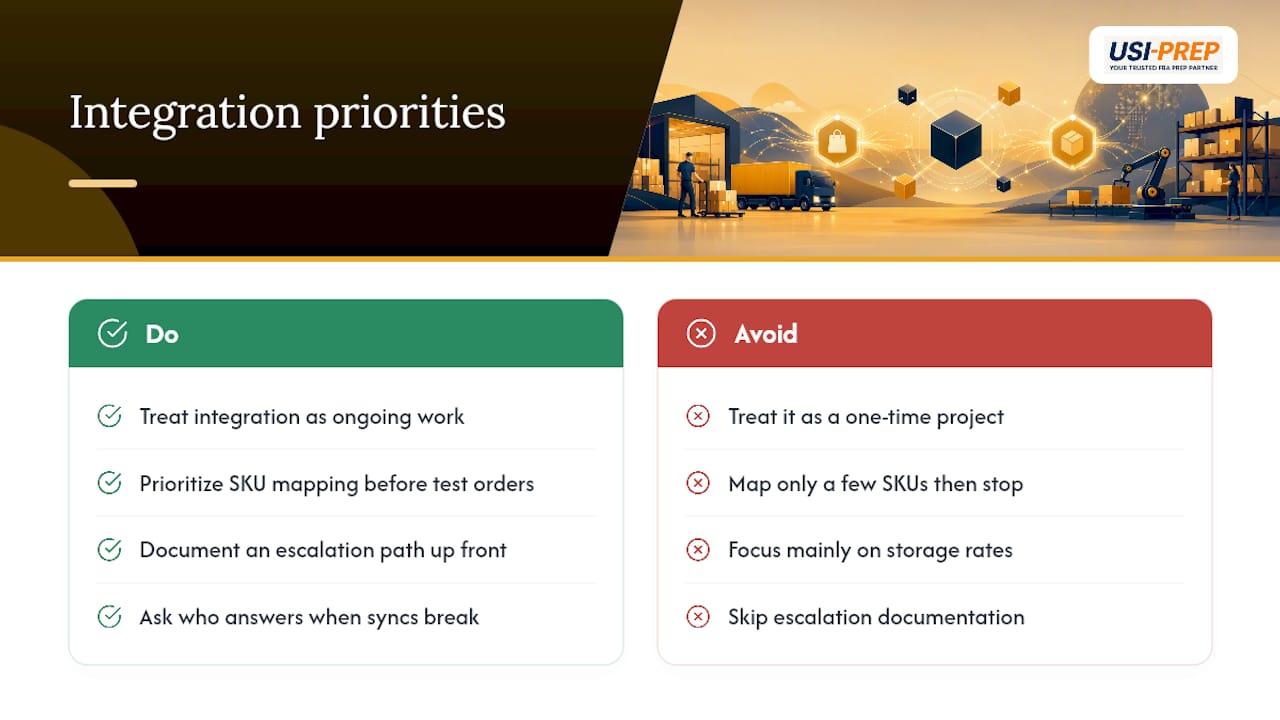
The conventional wisdom also underrates error ownership. Merchants spend weeks evaluating a 3PL’s warehouse capacity and almost no time asking who answers the phone when a sync breaks at 11 PM on a Friday before a big sale. That question matters more than storage rates in most contracts I’ve seen discussed.
If you take one thing from this guide, prioritize the mapping work before you ever send a test order. A clean SKU matrix and a documented escalation path will save you more headaches over the next year than any feature comparison between fulfillment apps.
— Akbar
Get Your Shopify Fulfillment Running Without the Guesswork
If your Shopify store needs a fulfillment partner that treats SKU mapping and error ownership as part of the job, not an afterthought, USIPrep runs FBA prep, inventory receiving, and pick/pack/ship operations built around the exact failure points covered above. Faster check-ins mean your inventory goes from pallet to sellable stock in less time, and when a sync question comes up, you get a direct answer instead of a support ticket queue.
Sellers preparing inventory for Amazon FBA can start with USIPrep’s FBA prep requirements checklist to see exactly what’s expected before your first shipment arrives. If you’re ready to talk specifics, request a quote and get a clear breakdown of per-unit costs before you commit to anything.
Sources
- Third-Party Logistics (3PL): What It Is and How It Works — Shopify blog
- Shopify 3PL integration — Celigo blog
- Multichannel order management — Linnworks (blog)