
The moment a carrier pickup or receiving appointment slips, confirm the appointment ID and slot details directly with the carrier, pull proof-of-delivery and booking evidence, and open a targeted escalation citing both. Success looks like an appointment confirmed or rebooked, POD in hand, and a plan protecting sellable inventory in the meantime. If a shipment shows zero units received after five days, or Carrier Central rejects the appointment outright, escalate immediately rather than waiting to see if it resolves on its own.
TL;DR:
- Most appointment issues stem from data mismatches, carrier overpromising, or backed-up receiving queues, which can be fixed with prompt documentation and escalation.
- Confirm appointment details, gather proof of delivery, and cross-check shipping data within the first 72 hours to prevent delays from escalating.
- Book appointments earlier than Amazon’s deadlines and ensure all booking fields, such as SCAC codes and PO numbers, are accurate and verified before confirmation.
- Escalate delays promptly after five days in off-peak periods or three days during peak seasons, with a comprehensive evidence package to trigger faster resolution.
- For recurring issues, consider outsourcing appointment management to specialized fulfillment providers that handle data validation, documentation, and escalation, reducing operational strain.
Table of Contents
- Why Carrier Appointment Delays Happen and What to Do First
- Immediate Action Checklist: What to Do in the First 24 to 72 Hours
- How to Book Appointments That Actually Hold
- Shipment Data Hygiene: The Fields That Break Appointments
- When Should You Escalate a Delayed Appointment?
- Building a Buffer So One Delay Doesn’t Sink Your Sales
- What I’ve Learned Watching Appointment Failures Repeat Themselves
- When It’s Time to Let a Fulfillment Partner Handle the Appointments
- Sources
Why Carrier Appointment Delays Happen and What to Do First
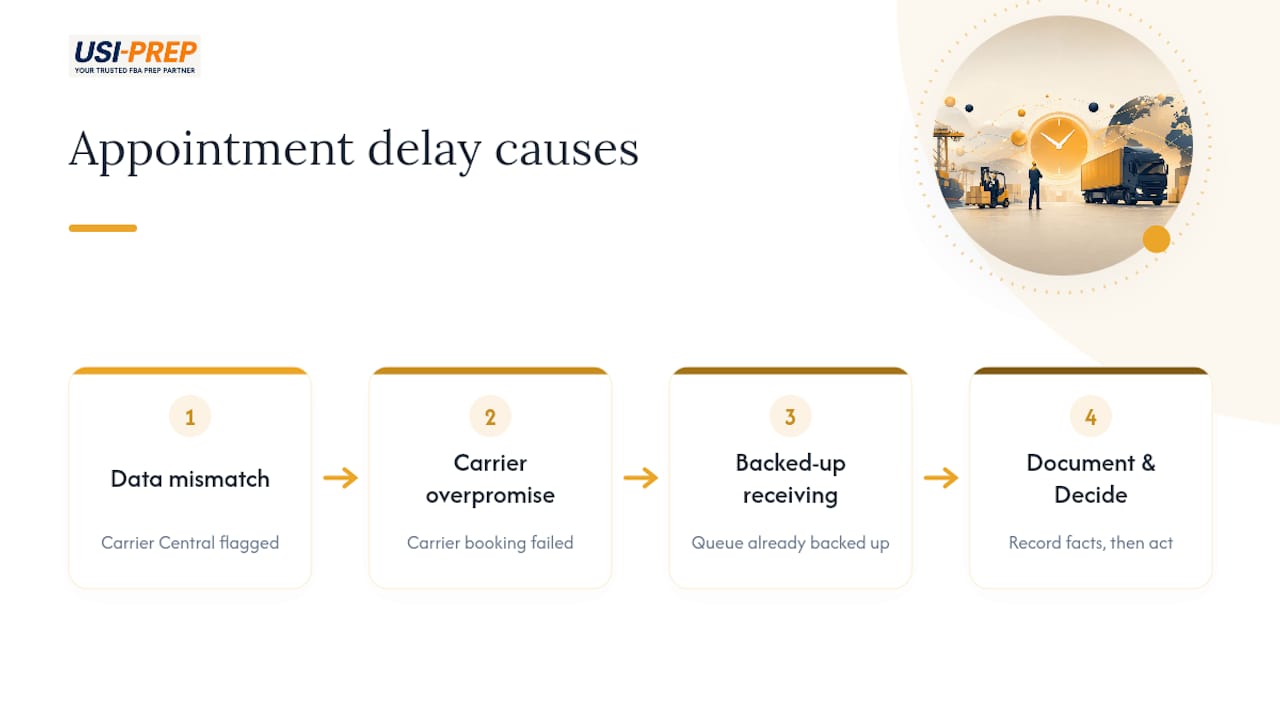
A rejected or missed appointment rarely comes from bad luck. It usually traces back to one of three things: a data mismatch Carrier Central flagged and nobody caught, a carrier that overpromised its Amazon booking experience, or a receiving queue that was already backed up before your trailer showed up. Knowing which one you’re dealing with changes what you do next.
The good news is that most carrier scheduling problems are fixable if you move fast and document everything. The bad news is that “Delivered” on your shipment tracker means almost nothing on its own. Sellers on Amazon’s own forums have flagged cases where a trailer registers as delivered but the units sit untouched in receiving for over a week, especially during peak season congestion. Treat delivery confirmation as the start of a new waiting period, not the end of one.
Immediate Action Checklist: What to Do in the First 24 to 72 Hours
Freight scheduling delays compound quickly if nobody owns the problem. Run through this sequence the moment you notice an appointment has slipped, been rejected, or gone quiet:
- Confirm and log the appointment ID, FC code, and exact time slot directly from the carrier, not from memory or an old email thread.
- Collect POD, PRO or BOL number, trailer number, and time-stamped photos the moment the truck arrives, or push the carrier for these if it hasn’t yet.
- Cross-check your Seller Central shipment and PO identifiers against what the carrier submitted to Carrier Central. Mismatches here are a leading cause of freight appointment issues.
- Set a monitoring trigger based on days since delivery, and commit to opening a case the moment that trigger fires rather than waiting another day “to be safe.”
- Protect revenue on affected SKUs: pause or trim ad spend feeding listings with stuck inventory, and flip top sellers to merchant-fulfilled if the delay threatens a stockout.
- Archive every email, chat log, and call summary with timestamps. Case reviewers respond faster to a clean paper trail than a vague complaint.
- If the carrier can’t produce documentation within a few hours of being asked, escalate within their organization or start looking at a backup carrier for future loads.
- Assign one person as the accountable owner of the case from open to close. Split ownership is how these things drag on for two extra weeks.
Pro Tip: Build a shared tracker (even a simple spreadsheet) that logs appointment ID, trigger date, and case number for every shipment in transit. The five minutes it takes to update it saves hours when you’re chasing three delayed shipments at once.
How to Book Appointments That Actually Hold
Most transportation appointment delays trace back to the booking stage, not the pickup itself. Amazon’s published inbound deadlines reflect Amazon’s own receiving capacity, not a courtesy buffer for you. Treat those dates as the floor, not the target, and book earlier whenever your carrier’s schedule allows it.
Before you confirm any slot, require the carrier to hand over:
- A written appointment confirmation with the exact date, time, and FC code
- The Amazon Reference ID tied to that appointment
- PRO or BOL numbers assigned to the load
- Confirmation that the SCAC on file matches what’s registered with Carrier Central
Avoid splitting shipments across multiple destinations unless there’s a real reason to. Splits multiply your risk surface because the slowest leg sets your effective check-in date for the entire order, a dynamic well documented in FBA receiving variability data. One delayed pallet at one FC can hold up inventory that otherwise would have been sellable days earlier.
Carrier Central’s validation layer rejects a surprising number of appointments over small formatting issues: a missing SCAC, a PO list formatted incorrectly, or a pallet count that doesn’t match what’s on the shipping plan. Before booking with any new carrier, ask directly how many Amazon appointments they’ve completed in the last quarter and whether they’ve ever had a slot rejected for data errors. A carrier that hesitates on that question is telling you something.
Shipment Data Hygiene: The Fields That Break Appointments
Freight carrier appointment problems are, more often than not, data problems wearing a scheduling disguise. Amazon’s Carrier Central validates a specific set of fields before it will confirm a slot, and a single wrong entry can bounce the whole request back.
Check these before every booking request goes out:
- SCAC code matches exactly what’s registered with the carrier
- PRO or BOL number is present and formatted the way Carrier Central expects
- Vendor code and PO IDs match your Seller Central shipment record character for character
- Pallet count, carton count, and unit count reconcile across every document
- Trailer number is entered and correct
- A working contact phone number and email are attached to the load
A common rejection reason worth flagging: pallet counts that don’t match between the shipping plan and what the carrier submits at booking. It happens when a warehouse repacks freight after the plan was finalized and nobody updates the paperwork.
Pro Tip: Ask your carrier to send back a written confirmation of every field before the appointment is locked in. A two-minute email exchange catches typos that would otherwise cost you a rejected slot and a week of rebooking.
Whoever owns booking should sign off on this checklist every time, not just when something goes wrong. Most scheduling problems trace back to a rushed submission, not a systemic failure.
When Should You Escalate a Delayed Appointment?
The honest answer depends on the season. Practitioner data puts normal receiving windows at roughly 2 to 6 days, stretching to two to four weeks or longer once peak volume hits. During the busiest stretches, trailers have reportedly sat 7 to 14 days before anyone touched them.
Set your internal trigger accordingly:
- Off-peak: escalate at 5 days with zero units received.
- During promotions or peak season: tighten that to 3 days for top-priority SKUs, since a delay compounds faster when demand is high.
- Immediate escalation, regardless of season: an appointment outright rejected, or a trailer marked delivered with no movement after a week.
When you do open a case, attach everything at once: appointment ID, POD, time-stamped photos, BOL or PRO number, Seller Central shipment IDs, and a clear timeline. Vague complaints get templated responses. Specific asks backed by documented evidence get resolved faster.
One distinction matters here: a shipment marked “Delivered” with no units received is a reconciliation problem, not strictly a delay. Reconcile units shipped against units received before deciding whether you’re filing a short-receipt case or a straightforward freight claim against the carrier. Filing the wrong type of case just adds another round trip to an already slow process.
Building a Buffer So One Delay Doesn’t Sink Your Sales
The impact of delays on shipping rarely stays contained to one shipment. A stuck pallet at one FC can trigger a stockout, a lost Buy Box, and a slower relaunch once inventory finally clears. The fix isn’t to eliminate delays entirely. It’s to make sure no single delay can take down a whole SKU.
- Keep a modest buffer of your top SKUs at a 3PL or a merchant-fulfilled backup channel, sized to cover your typical replenishment cycle plus a week.
- Set an automated trigger to flip a SKU from FBA to FBM when days-since-delivery crosses your threshold, and know in advance what that costs you in fulfillment fees versus a stockout.
- Reserve expediting for cases where the math actually works. Paying rush freight only makes sense when the lost-sales cost during downtime exceeds the premium.
- Write down, in one line, who has authority to approve an expedited and at what days-since-delivery mark that authority kicks in. Ambiguity here is what turns a two-day delay into a two-week one.
A small buffer at a reliable partner is often cheaper than the alternative: paying premium rates to expedite after the fact, or watching a bestseller go out of stock during its best week.
What I’ve Learned Watching Appointment Failures Repeat Themselves
The same three failure modes show up again and again: a mismatched PO field nobody double checked, a carrier that claimed Amazon experience it didn’t have, and a seller who waited too long to escalate because the shipment still said “in transit.” None of these are exotic problems. They’re all preventable with basic data discipline and a willingness to escalate before day ten instead of day twenty.
USIPrep grew out of that exact frustration. The founders were Amazon sellers first, and they built the company around the idea that fulfillment shouldn’t require constant firefighting. Those aren’t abstractions. They’re the direct result of catching data errors before they become appointment rejections, and escalating before a delay becomes a stockout.
— Akbar
When It’s Time to Let a Fulfillment Partner Handle the Appointments
If you’ve run this playbook more than twice this quarter, that’s the signal. Recurring receiving delays, a team stretched too thin to chase every appointment, or repeated Carrier Central rejections all point to the same conclusion: the problem isn’t a bad week, it’s a capacity gap. A specialized service provider exists for exactly this situation.

A specialized FBA prep and fulfillment partner does the unglamorous work that prevents most delays in the first place: preflighting shipment data before it ever reaches Carrier Central, collecting POD and booking evidence automatically, and escalating the moment a trigger fires instead of waiting for you to notice. That represents the gap between a seller managing appointments part time and a team whose entire job is making sure freight moves. This specialized service provider built its process around former Amazon sellers’ frustrations with unreliable logistics, aiming to deliver both faster check-ins and lower costs rather than one at the expense of the other.
If recurring appointment problems are already eating into your margins, take a look at how USIPrep speeds up FBA prep and see whether an assessment of your current fulfillment setup makes sense before the next peak season arrives.
Sources
- Amazon Carrier Central
- The True Cost of an FBA Receiving Delay: When Delivered Doesn’t Mean Sellable – Velocity Sellers
- Seller forum discussion on receiving delays