
Multichannel inventory sync keeps every sales channel updated from one authoritative stock source, so a sale on Amazon instantly adjusts what’s available on Shopify, Walmart, and eBay. The direct payoff is fewer cancellations, less panic-buffering, and less cash frozen in redundant safety stock. Getting there takes three things: clean SKU-level tracking, a sync method that updates fast enough to matter, and rules for what happens when systems disagree.
TL;DR:
- Automated, real-time inventory sync reduces overselling risks and improves cash flow by maintaining a single, trusted stock count across all sales channels.
- Successful setup relies on thorough SKU standardization, creating a master SKU mapping, and choosing the appropriate integration architecture, like event-driven sync.
- Common causes of sync failures include SKU mismatches, slow warehouse receiving processes, and incorrect safety buffers, which can often be addressed without new software.
- Moving beyond basic tools is necessary when inventory exceeds roughly 200 SKUs or multiple warehouses, requiring platform features like multi-location tracking and predictive reordering.
- Physical warehouse issues, such as slow check-ins and mislabeling, often underpin sync problems, making efficient fulfillment and accurate location management essential.
Table of Contents
- What Is Multichannel Inventory Sync and Why It Matters
- The Building Blocks: SKU Mapping, APIs, and Sync Architecture
- Why Sellers Oversell, Overstock, and Mismatch SKUs
- How to Set Up Automated Inventory Sync: A Step-by-Step Checklist
- When Do You Need an ERP or Full Inventory Platform?
- Where Physical Fulfillment Breaks Multichannel Sync
- What I’d Fix First If I Were Short on Time
- A Different Fix: When the Problem Is Your Warehouse, Not Your Software
- Sources
- FAQ
What Is Multichannel Inventory Sync and Why It Matters
Picture a seller running the same 30 SKUs on a direct-to-consumer Shopify store, Amazon FBA, and a Walmart Marketplace listing. Without sync, that seller manually checks three dashboards, or worse, guesses. One sale on Amazon doesn’t touch the Shopify count until someone remembers to update it. A customer orders the last unit on two channels within the hour, and now there’s a cancellation to process and an apology email to write.
Cross-channel inventory tracking closes that gap. Instead of three separate stock counts, there’s one number that all three channels read from and write to. The seller benefits directly:
- Fewer canceled orders and refunds tied to overselling
- Better cash flow, since less money sits in duplicate safety stock across channels
- Lower total safety stock, because one accurate number replaces three padded guesses
- Faster reordering decisions, since real demand shows up in one place instead of scattered across platforms
The metrics worth tracking weekly are stock accuracy (how often system counts match physical counts), oversell incidents per month, and days of inventory on hand. A seller who cuts oversells from ten a month to near zero usually finds it’s not because they added more stock. It’s because they finally trusted one number.
The Building Blocks: SKU Mapping, APIs, and Sync Architecture
Multichannel stock management runs on three technical layers, and skipping any one of them is why most sync setups eventually break.
SKU-level tracking and the golden record. Every variant, every bundle, every private-label version needs one unique identifier that all channels agree on. The most common point of failure in multichannel sync isn’t a broken integration. It’s SKU mapping mismatches where “BLK-TSHIRT-M” on Shopify doesn’t match “TS-BLACK-MED” on Amazon. Before connecting any automation tool, build a single master list, often called a golden record, that maps every channel-specific SKU back to one internal identifier.
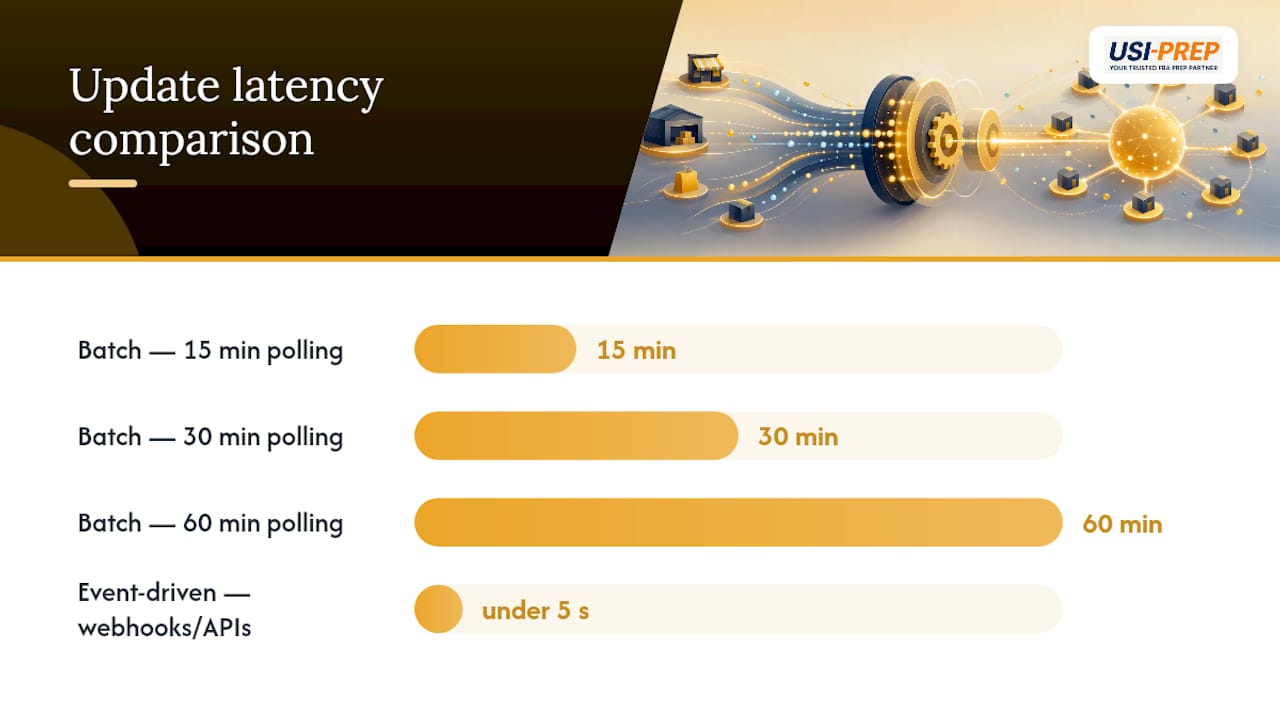
Event-driven sync versus batch polling. Batch sync checks inventory levels every 15, 30, or 60 minutes. Event-driven sync fires the moment a sale happens, using webhooks and APIs instead of a timer. Some sync engines using event-driven architectures report channel updates in under five seconds, which matters enormously during a flash sale when ten units can sell out in that window between batch checks.
Reserved versus available quantity. Inventory APIs typically track on-hand quantity separately from reserved quantity, meaning available stock equals on-hand minus reserved. That distinction is what stops a pending order from silently disappearing from another channel’s count.
Pro Tip: If two orders hit the last unit within milliseconds of each other, whichever system updates last can overwrite the other’s change. Look for platforms that use compare-and-swap logic, which checks the current value before writing a new one, to avoid this exact race condition.
Why Sellers Oversell, Overstock, and Mismatch SKUs
Most sync failures trace back to four repeat offenders, and each has a fix that doesn’t require new software.
- Overselling. Usually caused by sync lag, no safety buffer, or no clear “authority” system deciding what the real count is. Fix it by setting a small buffer (2 to 5 units depending on velocity), shortening reservation timeouts on abandoned carts, and naming one system as the source of truth for on-hand counts.
- Overstocking. Happens when reorder points are set on gut feeling instead of actual sales velocity. A demand-informed reorder point, recalculated monthly, catches slow movers before they tie up warehouse space and cash.
- SKU mismatch. Comes from inconsistent naming across channels. Run a full SKU audit, standardize a naming convention, and deduplicate any variant that’s listed under two different identifiers.
- Bundle and kit errors. A kit sale needs to decrement every component SKU, not just the bundle SKU. Bundles and kits require transactional updates so a spike in bundle sales doesn’t quietly oversell the individual parts sitting in other listings. Sellers running frequent kitting operations often find it faster to outsource the physical bundling step rather than trying to model every combination in software alone.
How to Set Up Automated Inventory Sync: A Step-by-Step Checklist
Setting up sync correctly the first time saves months of firefighting later. Follow this order, not a scattered version of it.
- Audit and normalize every SKU. Pull a full export from each channel and flag every naming inconsistency before touching any integration.
- Build the golden record. Create one master mapping table that ties every channel SKU to a single internal identifier, following established SKU mapping practices.
- Choose your integration pattern. Native connectors work for simple two- or three-channel setups. Middleware or an API-driven integration fits sellers with five or more channels or custom bundle logic.
- Map attributes and bundle logic. Confirm that kits decrement components correctly and that variant attributes (size, color) carry through cleanly on every channel.
- Set channel-specific safety buffers. A fast-moving Amazon listing might need a bigger buffer than a slow DTC storefront selling the same item.
- Test with controlled orders. Place small test orders on each channel and confirm the count drops everywhere within the expected window.
- Turn on alerts and monitor sync health. Set notifications for failed syncs, negative inventory, or counts that drift more than a small percentage from physical counts.
Free-tier tools can work for a small catalog while you standardize this process, though most cap out around 25 SKUs or a single warehouse before you’ll need to upgrade. Skipping straight to automation without step 1 or 2 is the single biggest reason sync projects fail within the first month.
When Do You Need an ERP or Full Inventory Platform?
Spreadsheets and basic connectors run out of road at a predictable point. The usual triggers: crossing roughly 200 to 300 active SKUs, adding a second warehouse, running frequent kitting or bundling, or processing enough daily orders that manual reconciliation eats hours instead of minutes.
Past that point, look for platforms offering:
- Channel-specific allocation rules, so a promotional channel can hold different stock levels than a wholesale account
- Asynchronous reconciliation that catches and corrects drift automatically instead of waiting for a manual audit
- Predictive reorder alerts based on sales velocity and lead time, which reduce the safety stock a business has to carry while still avoiding stockouts, a core benefit of ERP inventory systems
- Multi-location visibility with barcode or RFID scanning built into receiving and picking, standard in most modern WMS platforms
The trade-off is cost and setup time. A full WMS or ERP migration takes weeks, not days, and usually justifies bringing in a vendor or integration consultant rather than DIY-ing the connection work.
Where Physical Fulfillment Breaks Multichannel Sync
Software can’t fix a warehouse problem. Slow, error-prone receiving creates phantom stock, units that exist on paper but aren’t actually shelved or scannable yet, which throws off every channel reading from that count. Fast, accurate check-ins and clear location mapping close that gap directly, and a fulfillment partner that handles both the physical and integration side reduces reconciliation errors before they ever hit your sync tool.

What I’d Fix First If I Were Short on Time
If your sync is a mess and you only have a week, skip the software shopping. Fix SKU consistency first, since a mismapped SKU breaks every automation you layer on top of it. Then assign one system as your single source of truth. Only after that should you tune safety buffers per channel. Three quick wins: run a SKU audit today, set a five-unit buffer on your fastest-moving listing, and turn on low-stock alerts. If oversells are still happening weekly, pause any new channel launch until the current setup stabilizes. Adding a fourth sales channel to a broken three-channel sync just multiplies the damage.
— Akbar
A Different Fix: When the Problem Is Your Warehouse, Not Your Software
Not every sync failure is a software problem. If your counts drift because receiving is slow, locations aren’t labeled clearly, or FBA prep errors keep creating phantom stock, no integration tool will fix that on its own. A fulfillment partner can address this gap with faster, more accurate check-ins, transparent location tracking, and FBA prep handled by an experienced team to fix common warehouse issues that affect inventory sync.

If your sync issues trace back to slow or messy receiving rather than a broken integration, start with the FBA Prep Requirements Checklist to see exactly where your current process is losing time, then request a consultation to walk through your specific warehouse setup.
Sources
For readers who want to go deeper on the technical side:
FAQ
What Is Multichannel Inventory Sync?
It’s the practice of connecting every sales channel to one authoritative stock count, so a sale on any platform updates availability everywhere else in real time or near real time.
How Do I Stop Overselling Across Channels?
Set a small safety buffer per channel, assign one system as the authority for on-hand counts, and shorten reservation timeouts so abandoned carts release stock quickly.
What’s the Difference Between Real-Time and Batch Sync?
Batch sync updates on a timer, often every 15 to 60 minutes, while event-driven real-time sync updates the instant a sale happens using webhooks, which cuts the window where oversells can occur.
Do I Need an ERP to Sync Inventory Across Channels?
Not at the start. Most sellers can run accurate sync with a native connector or middleware until they cross roughly 200 to 300 SKUs, add a second warehouse, or need advanced kitting logic.
Can a Fulfillment Partner Help With Sync Problems?
Yes, when the root cause is physical rather than digital. A partner like Usiprep improves receiving speed and location accuracy, which reduces the phantom stock and reconciliation errors that throw off sync counts in the first place.