
An Amazon removal order is a formal request submitted through Seller Central to remove specific inventory units from Amazon fulfillment centers via return, disposal, or liquidation. Every FBA seller eventually faces slow-moving stock, compliance issues, or seasonal overstock. Knowing what is an Amazon removal order, when to use one, and what it costs separates sellers who control their margins from those who bleed money on storage fees. This guide covers the full removal order process, fee structures, and the timing strategies that protect your Inventory Performance Index (IPI) and your bottom line.
What is an Amazon removal order and why does it matter?
An Amazon removal order is the official mechanism FBA sellers use to exit inventory from Amazon’s fulfillment network before fees compound. The three available destinations are return to seller, liquidation, and disposal. Each serves a different business situation, and choosing the wrong one costs real money.
Return to seller sends your units back to an address you specify. This option works best when the product is resalable, can be reworked, or has value in another sales channel. Liquidation routes your inventory through Amazon’s liquidation partners at a fraction of retail value. Disposal instructs Amazon to destroy the units entirely.

The core reason sellers file an amazon inventory removal request is to avoid Amazon’s aged inventory surcharges, which kick in at 181 days of storage. Getting ahead of that threshold is the single most important timing decision in removal order management.
What are the main types of Amazon removal orders?
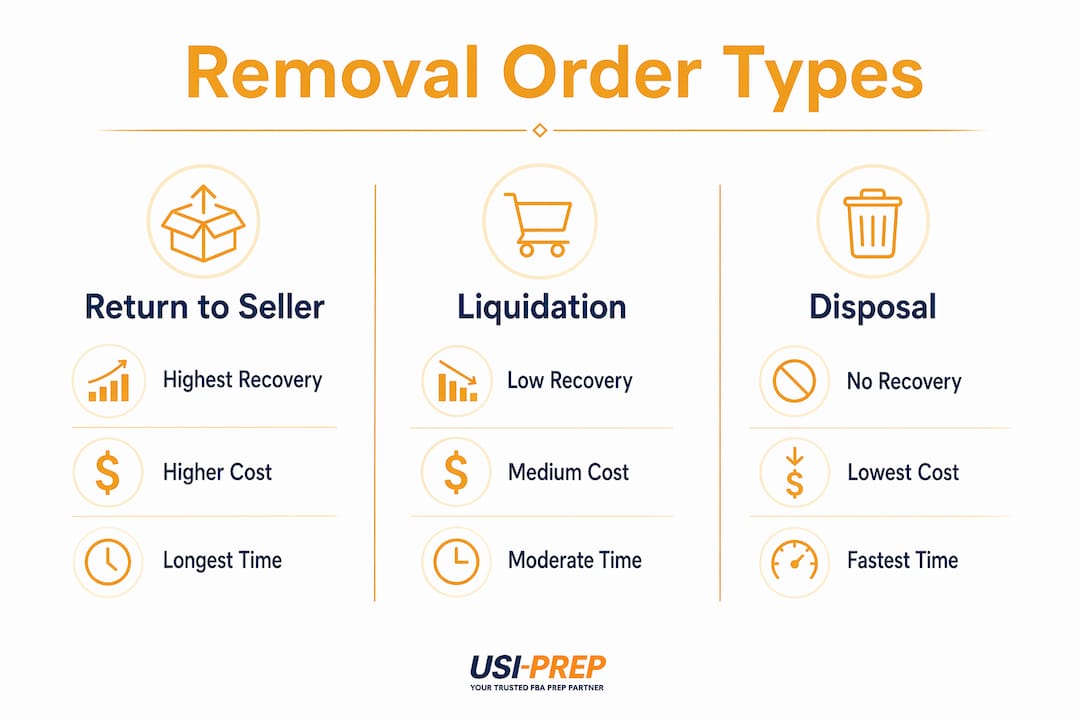
The three removal types differ sharply on cost, speed, and how much value you recover from the inventory.
Return to seller
This option delivers the highest recovery potential. You get your units back and can resell them on your own website, through retail arbitrage, or after rework. The trade-off is cost. Return fees run $0.50–$1.00 per standard unit and $1.50 or more for oversize items, plus you absorb outbound shipping. If your product costs $3 to manufacture and retails for $8, a return still makes sense. If it retails for $5, the math gets tight fast.
Liquidation
Liquidation sends your units to Amazon’s wholesale liquidation partners. Recovery averages 5–10% of retail value, which sounds low but beats paying months of storage fees on dead stock. The fees are lower than a return, and you avoid the logistics of receiving and restocking units yourself. This option fits aged inventory with low resale potential or products that are too bulky to ship back economically.
Disposal
Disposal is the cheapest per-unit option and the most final. Amazon destroys the units, you pay a small fee, and the inventory is gone. Disposal fees are the lowest available, but recovery is zero. Use disposal only for damaged goods, expired products, or items with no resale path.
| Removal type | Cost per unit | Recovery potential | Best use case |
|---|---|---|---|
| Return to seller | $0.50–$1.50+ | High | Resalable, reworkable stock |
| Liquidation | Lower than return | 5–10% of retail | Aged, slow-moving inventory |
| Disposal | Lowest | None | Damaged, expired, unsellable |
Pro Tip: Before choosing a removal type, calculate your total landed cost per unit including removal fees, inbound shipping if you return it, and any rework labor. That number tells you whether a return or liquidation makes more financial sense.
How does the Amazon removal order process work?
The amazon removal order process runs through Seller Central and follows a predictable sequence. Here is how it works from start to finish.
- Log into Seller Central and go to “Manage FBA Inventory” under the Inventory menu.
- Select the units you want to remove by checking the box next to each SKU.
- Click “Create Removal Order” from the action dropdown.
- Choose your removal method: return, liquidation, or disposal.
- Enter a return address if you selected return to seller. Confirm the order.
- Track the status in Seller Central under “FBA Removal Orders” in the Reports section.
Standard processing takes 14–30 business days under normal conditions. During Q4 and other peak periods, that window can stretch to 90 days. That delay matters enormously for timing your removals around storage fee cutoffs.
Cancellation is only possible within a short window before Amazon begins processing. Once the order moves into active processing, it cannot be reversed. Plan your removals carefully before submitting.
Pro Tip: Set a recurring calendar reminder for the 15th of each month to audit your FBA inventory age report. Catching slow movers early gives you time to act before the 181-day clock becomes a problem.
What costs are associated with Amazon removal orders?
Removal order fees are charged per unit upon order completion, not when you submit the request. The exact amount depends on unit size, weight, and the removal method you choose.
Key cost factors to understand:
- Standard unit returns: $0.50–$1.00 per unit
- Oversize unit returns: $1.50 or more per unit
- Liquidation fees: Lower than return fees, but recovery is only 5–10% of retail
- Disposal fees: The lowest per-unit cost, with zero recovery
- Outbound shipping: Charged separately for returns, based on weight and destination
The cost-benefit calculation sellers must run before every removal order is straightforward. Compare the removal fee plus any shipping or rework costs against the monthly storage fees you would pay if the inventory stays. A proper cost-benefit analysis also factors in the expected resale value after the return, which changes the math significantly depending on your product category.
Understanding how Amazon storage fees work is the foundation for making smart removal decisions. A unit paying $2 per month in long-term storage fees costs $24 per year to store. A $1 removal fee looks cheap by comparison.
How to time Amazon removal orders to avoid storage fees
Timing is where most sellers lose money on removal orders. The 181-day aged storage surcharge is Amazon’s penalty for slow-moving inventory, and the removal order process itself takes time to complete.
Initiating removals at day 150 of storage is the standard best practice for sellers who want to avoid the surcharge entirely. With processing times of up to 30 days, a removal submitted at day 150 clears before the 181-day threshold. Waiting until day 170 or later almost guarantees you pay at least one month of the surcharge.
Key timing practices that protect your margins:
- Submit removals at day 150 for any SKU with declining sales velocity
- Schedule post-peak season audits in january and february for seasonal products sold heavily in Q4
- Monitor your IPI score monthly. Removal orders improve IPI by clearing low-velocity stock and freeing capacity for faster-moving products
- Use Amazon’s auto-removal settings for unfulfillable inventory, but configure them carefully to avoid unintended disposals
- Track SKU velocity weekly for any product that has not sold in 60 days
Calendar-based removal scheduling after peak seasons is the most reliable way to keep aged inventory from accumulating. Sellers who treat removal orders as a monthly hygiene task rather than an emergency response consistently pay less in storage fees.
Pro Tip: Pull your FBA Inventory Age report every month and sort by units older than 120 days. Any SKU with fewer than two sales in the past 30 days and more than 120 days of storage age is a removal candidate. Act at 150 days, not 180.
Pairing good removal timing with clean FBA inventory check-in practices also reduces the risk of units sitting uncounted in fulfillment centers longer than expected.
Key Takeaways
An Amazon removal order is the most direct tool FBA sellers have to control storage costs, protect IPI scores, and recover value from slow-moving inventory before fees compound.
| Point | Details |
|---|---|
| Three removal types | Return, liquidation, and disposal each offer different cost and recovery trade-offs. |
| Day 150 timing rule | Submit removals at day 150 of storage to clear before the 181-day surcharge applies. |
| Processing window | Standard removal orders take 14–30 business days; plan for up to 90 days during Q4. |
| Cost-benefit analysis | Compare removal fees plus shipping against ongoing storage fees before choosing a method. |
| IPI impact | Regular removals of slow-moving stock improve your IPI score and free storage capacity. |
Why removal orders are a sign of discipline, not defeat
Sellers often treat removal orders as an admission that something went wrong. That framing is backwards. Removal orders are proactive inventory hygiene tools, not signals of failure. The sellers I have seen struggle most with FBA costs are the ones who let inventory age because pulling it feels like giving up.
The math is simple. Every month you delay a removal on a slow-moving SKU, you pay storage fees that eat into whatever margin you had left. A disciplined removal order calendar is one of the fastest ways to improve cash flow without changing a single thing about your sourcing or pricing.
The biggest misconception I see is sellers defaulting to returns when liquidation or disposal would serve them better. If a unit costs $4 to ship back, $1 to rework, and retails for $6, you are spending $5 to recover $6. Liquidation at 5–10% of retail on a $20 product nets you $1–$2 with far less effort. Run the numbers every time.
My honest recommendation: build a removal review into your monthly operations calendar, not your quarterly one. Inventory age compounds faster than most sellers expect, and the 181-day threshold arrives without warning if you are not watching. Treat removal orders the way a good accountant treats accounts receivable. Review them regularly, act early, and never let them pile up.
— Akbar
How Usiprep helps sellers reduce costly removals
Removal orders often trace back to upstream problems: incorrect prep, packaging failures, or compliance errors that make inventory unsellable before it ever gets a chance to sell.

Usiprep was founded by former Amazon sellers who understand exactly how those errors happen and what they cost. The team handles FBA prep requirements with the accuracy that prevents compliance-driven removals before they start. With a 98.9% on-time delivery rate and a track record of reducing fulfillment costs by 30% for many brands, Usiprep gives sellers the operational foundation to keep inventory moving instead of sitting. Sellers who get prep right from the start file far fewer removal orders, and the ones they do file are strategic choices, not damage control.
FAQ
What is an Amazon removal order used for?
An Amazon removal order is used to remove FBA inventory from Amazon fulfillment centers through return, liquidation, or disposal. Sellers use it to avoid long-term storage fees, manage overstock, and clear unsellable units.
How long does an Amazon removal order take to process?
Standard processing takes 14–30 business days, but can extend to 90 days during peak periods like Q4. Submit removals early to account for this window.
Can I cancel an Amazon removal order after submitting it?
Cancellation is only possible within a brief window before Amazon begins processing. Once the order is active, it cannot be reversed.
What is the cheapest Amazon removal order option?
Disposal is the lowest-cost removal method per unit, but it results in zero inventory recovery. Liquidation costs slightly more but returns 5–10% of retail value.
How do removal orders affect my Inventory Performance Index?
Removal orders improve IPI by clearing slow-moving stock and freeing storage capacity for higher-velocity products, which positively impacts your seller metrics and available storage limits.