
To sell your stuff on eBay, you need to do five things in order: prepare your item and account, create a complete listing, set a price that covers your costs, ship with an eBay label, and manage the sale through to payout. That’s the whole process. You can get your first listing live within an hour using eBay’s Seller Hub, and payments flow through eBay Managed Payments directly to your bank account, usually within two business days of the sale.
Start here — do these four things in the next 60 minutes:
- Create a free eBay seller account and connect your bank account through eBay Managed Payments
- Pick one item to sell, photograph it in natural light against a plain background
- Search eBay’s “Sold” listings for that item to find realistic comps
- Weigh the item and its packaging on a kitchen scale so you can set accurate shipping costs
Key Takeaways
Selling on eBay successfully requires accurate listings, fee-aware pricing, and reliable shipping from your very first sale.
| Point | Details |
|---|---|
| Start with account setup | Connect your bank through eBay Managed Payments and list low-risk items first to build limits and feedback. |
| Price using sold comps | Filter eBay search to “Sold Items” and use the median price as your anchor before setting any listing price. |
| Know your real fees | Combined eBay fees run roughly sixteen percent of total buyer payment; always calculate net payout before you list. |
| Ship with eBay labels | eBay discounted labels can cut postage significantly and auto-upload tracking, protecting you in any dispute. |
| Usiprep for scaling sellers | When daily packing exceeds two hours or errors rise, Usiprep’s fulfillment service reduces costs and handles logistics end to end. |
Table of Contents
- What to prepare before you list your first item
- How to sell your stuff on eBay: the step-by-step listing process
- How to price your item on eBay
- What do eBay fees actually cost you?
- How to ship and package your eBay sales
- What happens after your item sells?
- Quick tips to sell faster and rank higher in search
- Common mistakes that kill new sellers’ accounts
- Should you open an eBay Store?
- When your eBay volume outgrows your living room
- Sources
What to prepare before you list your first item
Getting your account and supplies ready before you list saves you from the most common beginner mistakes: mispriced shipping, blurry photos, and listing limits you didn’t know existed.
Account setup and payout method
Go to ebay.com, click “Sell,” and follow the prompts to register as a seller. You’ll need to verify your identity and connect a bank account through eBay Managed Payments, which is eBay’s built-in payment processor. This is not optional — all US sellers use it. Once connected, payouts land in your bank account on a schedule you control (daily, weekly, or on a set date).
New sellers face listing limits that typically start at around five items per month. Those limits increase as you build a sales history and maintain a positive record. The practical workaround: list a few low-risk, inexpensive items first. You learn the process, build feedback, and unlock higher limits faster than waiting.
Photo checklist
Your phone camera is fine. What matters is light and background.
- Front view — full item, plain white or neutral background
- Back view — especially for clothing, electronics, and collectibles
- Flaws — every scratch, stain, or missing piece gets its own close-up
- Tag or label — brand name, size, model number
- Scale reference — a coin, ruler, or hand next to the item so buyers know the actual size
Five photos is a good minimum. eBay allows up to 24, and listings with more photos tend to perform better.
Supplies to buy before you start
A kitchen scale or postal scale is the single most important purchase. Guessing package weight costs you money on every sale. Beyond that:
- Poly mailers (for soft goods and clothing)
- Assorted boxes (small, medium, and one flat-rate USPS box for heavy items)
- Packing tape and a tape gun
- Bubble wrap or packing paper for fragile items
- A thermal label printer (optional but worth it if you plan to sell regularly — it pays for itself fast)
Pro Tip: Buy a cheap postal scale before you list a single item. Underestimating shipping weight is the number-one way new sellers lose money on their first sales.
How to sell your stuff on eBay: the step-by-step listing process
eBay’s listing guide walks through every field you need to fill. Here’s how to approach each one so your first listing is complete and competitive.
Step 1: Choose your sale format
Two options: Buy It Now (fixed price) or Auction.
- Buy It Now works for most beginners. You set a price, and the item sells when a buyer pays it. Predictable, low-stress.
- Auction works when you have something rare or in high demand and you’re willing to accept whatever the market bids. Starting too low on a common item is how sellers lose money.
For your first few sales, use Buy It Now.
Step 2: Pick the right category
eBay’s category tool suggests options as you type your item name. Always choose the most specific applicable category. A “Men’s Levi’s 501 Jeans” listed under “Clothing, Shoes & Accessories > Men > Men’s Clothing > Jeans” will reach more targeted buyers than one filed under “Clothing.”
Step 3: Write a search-friendly title
eBay’s search engine (called Cassini) matches buyers to listings based on title keywords. You get 80 characters — use most of them.
A strong title includes:
- Brand name
- Model or product name
- Key attributes (color, size, material)
- Condition (if it helps, e.g., “New with Tags” or “Vintage”)
Example: Levi's 501 Men's Straight Jeans Size 32x30 Dark Wash New With Tags
Skip filler words like “look,” “nice,” “wow,” or “L@@K.” They waste character space and don’t match any search query.
Step 4: Fill in item specifics
This is the field most beginners skip. Item specifics are the structured data fields (brand, size, color, material, MPN) that eBay uses to filter search results. Incomplete item specifics push your listing lower in search. Fill every field that applies.
Step 5: Upload photos and write the description
Upload your photos in the order a buyer would want to see them: front first, then back, then details and flaws. In the description, lead with the most important facts (what it is, condition, size), then list any flaws in plain language. Don’t bury defects in the middle of a paragraph.

Step 6: Set condition accurately
eBay’s condition options range from “New” to “For Parts or Not Working.” Pick the one that matches reality, then describe specifics in the condition notes field. Overstating condition is the fastest route to a return request.
Step 7: Set your shipping options
Three choices:
- Calculated shipping — eBay calculates cost based on buyer’s zip code and your package weight/dimensions. Most accurate.
- Flat rate — you set one price for all buyers. Simple, but you’ll overpay or underpay depending on distance.
- Free shipping — you absorb the cost in your item price. Boosts visibility and buyer trust.
Pro Tip: Use this template for your first listing: Title: [Brand] [Model] [Size/Color] [Condition]; Category: [Most specific applicable]; Item Specifics: fill every field; Condition: [Accurate grade + flaw notes]; Shipping: Calculated, 1-day handling; Return policy: 30-day returns accepted.
How to price your item on eBay
Research sold comps first
Before you type a number, search eBay for your item, then filter results to “Sold Items” in the left sidebar. This shows what buyers actually paid, not what sellers are hoping to get. Look at the last 10–20 sold listings and find the median price. That’s your anchor.
Three-step comp research:
- Search your item’s exact title keywords
- Check “Sold Items” filter
- Note the median sale price, the condition of those sold items, and whether they included free shipping
Buy It Now vs. auction: the decision rule
Use auction when the item is rare, trending, or you genuinely don’t know what it’s worth. Use Buy It Now for everything else. Auctions on common items routinely close below market value because not enough bidders show up at the right moment.
Pricing workback example
Say you want $30 net on a $50 item. Here’s the math:
- Desired net: $30.00
- eBay fees (~16% of buyer payment): $8.00
- Shipping label cost (USPS Ground Advantage, 1 lb): ~$5.50
- Packaging supplies: ~$0.75
- Cost of goods (what you paid): varies
To net $30 after fees and shipping on a $50 sale, your cost of goods must be under $5.75. If you paid more, raise the price or find a cheaper shipping option.
Promoted Listings
Promoted Listings Standard is an optional ad program where you pay an extra percentage only when a buyer clicks your promoted listing and purchases within 30 days. Organic visibility without promotion has declined, so many sellers use it.
Raising it immediately after listing gives you no useful data.
What do eBay fees actually cost you?
Combining final value fees, per-order fees, and managed payments typically means a US seller pays roughly 16% of the buyer’s total payment before any promoted listing fees. Add a promoted listing at a modest percentage, and your effective take increases notably.
eBay fee breakdown
| Fee Type | Rate / Amount | Notes |
|---|---|---|
| Final Value Fee (FVF) | ~13.25% of total buyer payment | Applies to item price + shipping charged |
| Per-order FVF | $0.30 per order | Flat fee added to every transaction |
| Managed Payments processing | ~2.7% + $0.25 per order | Replaces PayPal; applied to total buyer payment |
| Insertion fee | $0.30 per listing (after free allotment) | First 50 listings/month are free for most sellers |
| Promoted Listings Standard | Variable % (you set it) | Only charged on sales attributed to the ad |
Important: eBay calculates FVF on the total buyer payment, which includes whatever shipping the buyer paid. If you charge $10 for shipping, eBay takes a cut of that $10 too. This surprises most new sellers.
Example: $50 sale, $8 shipping charged to buyer
- Total buyer payment: $58.00
- FVF (13.25%): $7.69
- Per-order FVF: $0.30
- Managed payments (2.7% + $0.25): $1.82
- Total fees: $9.81
- Shipping label cost (your actual cost): ~$5.50
- Net payout: $42.69
Should you buy an eBay Store subscription?
A Store subscription reduces your FVF by roughly 2–4 percentage points depending on category. The Starter Store costs $7.95/month. If you’re doing that volume, run the math — a Store often pays for itself quickly.
Pro Tip: Track your monthly gross sales in a simple spreadsheet. When your monthly eBay fees exceed $50 above what a Store subscription would cost, upgrade. Re-evaluate every 90 days.
You can also review fulfillment cost components to understand how platform fees fit into your total cost structure as you scale.
How to ship and package your eBay sales
Which carrier should you use?
Three main options: USPS, UPS, and FedEx. For most beginners selling small, light items, USPS wins on price.
- USPS Ground Advantage — best for packages under 2 lbs going anywhere in the US; flat pricing by weight, not distance
- USPS Priority Mail — faster (2–3 days) and includes free boxes; best for 2–5 lb packages
- UPS and FedEx — competitive for heavier packages (5+ lbs) and for commercial addresses; less convenient for residential drop-off
Use eBay shipping labels
Buying labels through eBay’s platform gives you discounted carrier rates that can run 20–40% below retail postage. There’s a second benefit most sellers miss: since FVF applies to the total buyer payment including shipping, lower actual shipping costs mean a lower FVF charge. Print the label, drop the package at any post office or carrier location, and tracking uploads automatically to the buyer’s order.
For more on cutting postage costs as your volume grows, see ways to lower shipping costs.
Packaging checklist
- Use a box that fits the item with 2 inches of cushioning on all sides
- Wrap fragile items in bubble wrap, then fill remaining space with packing paper (not air pockets alone)
- Double-box anything genuinely fragile: ceramics, electronics, glass
- Seal every seam with tape, not just the top flap
- Never reuse a crushed or weakened box — damage claims are expensive and damage your seller metrics
Pro Tip: Weigh your fully packed box before you list, not after. A $3 shipping error on a $15 sale wipes out your margin.
What happens after your item sells?
The timeline
Once a buyer pays, you have until your stated handling time (typically 1–3 business days) to ship. Most experienced sellers ship the next business day. eBay releases your payout to your bank account within two business days of confirmed delivery, though new sellers often see a brief hold on their first few transactions while eBay verifies the account.
Key rule: Upload tracking as soon as you ship. eBay’s system uses tracking confirmation to release payment and to protect you in any dispute. A package with no tracking is a package you can’t prove you sent.
Steps after a sale
- Pack the item securely using the checklist above
- Print your eBay shipping label (go to Seller Hub > Orders > Print Label)
- Drop off the package and keep the receipt
- Mark the item as shipped in eBay — tracking uploads automatically if you used an eBay label
- Watch for buyer messages and respond within 24 hours
How eBay Managed Payments works
Your payout appears in the Seller Hub under “Payments.” eBay deducts all fees before sending the net amount to your bank. You’ll see a clear breakdown of what was charged. New sellers sometimes see a 3–5 day hold on their first payouts; this is normal and lifts after a few successful transactions.
Handling returns and disputes
If a buyer opens a return request, respond within three business days. For a “not as described” claim, eBay almost always sides with the buyer, so accurate condition descriptions are your best protection. For a “changed mind” return, your return policy governs — if you accept returns, issue a label and refund upon receipt.
When a dispute escalates, document everything: photos of the item before shipping, the tracking number, and any buyer messages. eBay’s resolution center walks you through each step. Community guidance for new sellers consistently emphasizes one rule: keep all communication inside eBay’s messaging system. Never move a conversation to email or text, and never accept payment outside eBay.
Quick tips to sell faster and rank higher in search
Five changes that consistently move listings up in eBay’s search results:
- Complete every item specific — listings with full item specifics rank higher in filtered searches; this is the easiest win most sellers ignore
- Use 5+ photos — more photos correlate with higher conversion; buyers trust what they can see
- Offer free shipping — eBay’s algorithm favors free-shipping listings, and buyers filter for them; build the cost into your price
- Respond to messages within hours — response time affects your seller metrics, which affect search placement
- List consistently — daily or near-daily listing activity signals an active store to eBay’s algorithm and keeps your items in fresh search results
Using Promoted Listings strategically
Promoted Listings Standard is worth testing once you have a few sales and know your margins. Don’t raise the rate until you have data.
Pro Tip: Before publishing any listing, run this five-second check: Does the title use real search keywords? Are all item specifics filled? Are there at least five photos? Is the condition description honest? Is shipping set correctly? If any answer is no, fix it before you go live.
Common mistakes that kill new sellers’ accounts
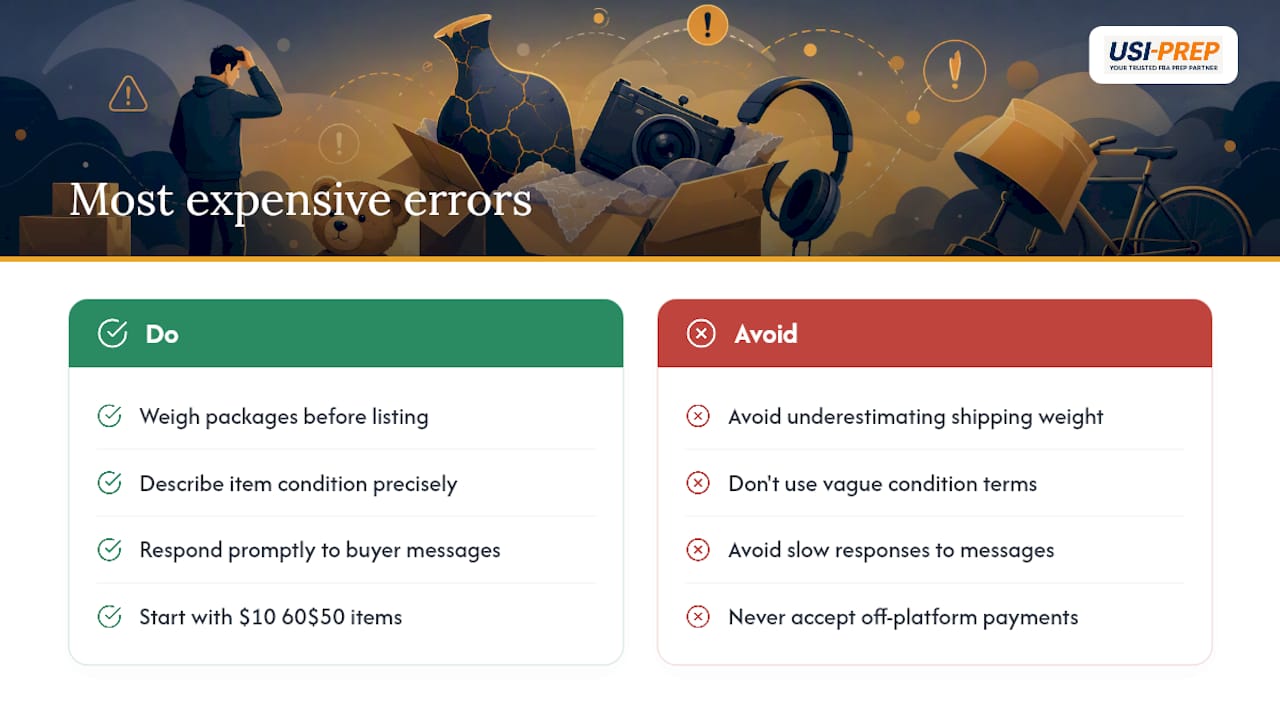
The most expensive errors
Underestimating shipping. Weigh every package before you list, not after. A 2-lb item in a box often weighs 3 lbs with packaging. That difference can cost $3–$5 per sale.
Vague condition descriptions. “Good condition” means nothing. “Small ink stain on inside collar, visible in photo 4” means something. Buyers who feel misled open returns and leave negative feedback.
Ignoring buyer messages. eBay tracks your response rate. Slow responses hurt your seller metrics and push your listings down in search. Set a phone notification for eBay messages.
Listing high-value items too early. Without feedback, buyers are skeptical of expensive purchases from new sellers. Build your reputation on $10–$50 items first.
Scam alert: If a buyer asks you to complete the transaction outside eBay, ship before payment clears, or accept a check or money order, stop. These are textbook scams. Every legitimate transaction happens inside eBay’s platform, and every payment clears before you ship.
Accepting off-platform payments voids eBay’s buyer and seller protections entirely. There is no recovery if something goes wrong outside the platform.
Should you open an eBay Store?
How Store subscriptions work
An eBay Store subscription reduces your Final Value Fee by roughly 2–4 percentage points in most categories and gives you more free insertion listings per month. The Starter Store runs $7.95/month; the Basic Store is $27.95/month.
Breakeven calculation
| Store Tier | Monthly Cost | Approx. FVF Reduction | Monthly Sales Needed to Break Even |
|---|---|---|---|
| Starter | $7.95 | ~2% | ~$400 in total buyer payments |
| Basic | $27.95 | ~3% | over $900 in total buyer payments |
To cover a $7.95 Starter Store fee, you need at least 8 sales per month at that price point.
The decision rule
If you’re selling fewer than 10 items per month, skip the Store for now. Once you’re consistently hitting $400–$500/month in sales, run the math. Scaling to consistent income requires systems — SKU tracking, listing cadence, and accurate shipping — not just a Store subscription.
Pro Tip: Calculate your last 30 days of eBay fees. If a Store subscription would have saved you more than its monthly cost, upgrade. If not, wait another month and check again.
One thing most beginners get backwards
Most new sellers obsess over getting more listings live and ignore margin math. The sellers who build sustainable income on eBay do the opposite: they run the numbers on every item before listing it, start small, and build systems before scaling volume.
When your eBay volume outgrows your living room
Once you’re shipping 10–20+ orders a day, packing takes hours, storage becomes a problem, and one shipping error can cost you your seller rating. That’s the point where outsourced fulfillment stops being a luxury and starts being a cost-reduction tool.
Usiprep handles receiving, labeling, pick/pack/ship, and returns for eBay sellers and other marketplace brands — founded by former Amazon sellers who built the service around the exact pain points that sink high-volume DIY operations. Sellers who move to Usiprep typically see a 30% reduction in fulfillment costs and a 98.9% on-time delivery rate, with full visibility into every order through the dashboard.
If you’re spending more than two hours a day packing, running out of storage space, or seeing shipping errors creep up, it’s worth a look at the FBA prep requirements checklist to see whether outsourcing fits your operation. You can also review Usiprep’s pricing to get a clear picture of what outsourced fulfillment actually costs at your volume.
Sources
- How to sell on eBay (Shopify blog)
- Selling on eBay | Electronics, Fashion, Home & Garden
- How to create a listing: Step-by-step guide (eBay Export)
- How much does eBay take per sale? (ProfitCalcu)